Threat Detection Using Behavioral AI
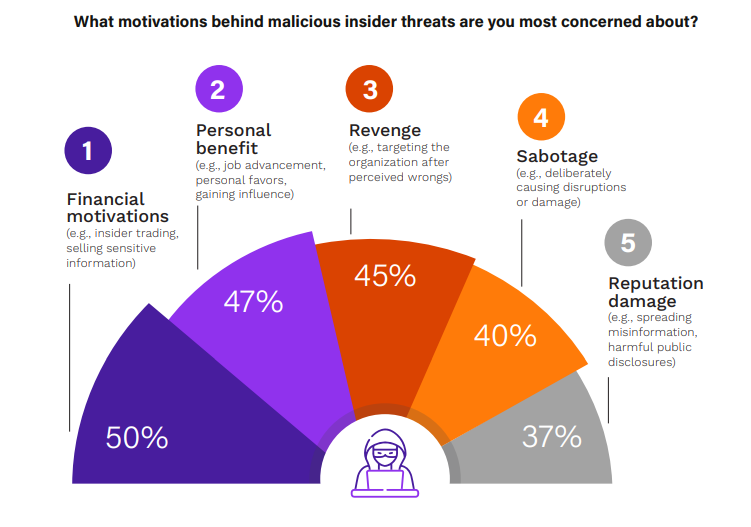
Insider threats cost organizations millions every year. In 2024 alone, 83% of companies faced at least one insider attack, with average losses hitting $17.4 million. These threats come from people already inside your network—employees, contractors, or even compromised accounts. They don’t need to break in. They already have the keys.
Traditional security tools struggle here. Firewalls and antivirus look for known bad files or suspicious IPs from outside. But an insider uses normal login details and works during business hours. That’s why threat detection using behavioral AI changes everything. It watches how people normally behave and spots the tiny changes that signal trouble.
This guide explains exactly how threat detection using behavioral AI works, why it beats old methods, real examples from companies using it today, and simple steps to get started. By the end, you’ll see why more organizations now rely on it to protect data, money, and reputation.

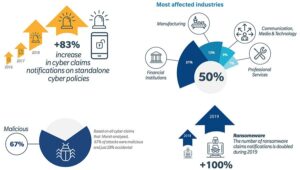
Image Credit: Insider Threat Statistics infographic from StationX (stationx.net)
What Exactly Are Insider Threats?
Insider threats happen when someone with authorized access does something harmful. It could be on purpose or by accident. Here are the main types:
- Malicious insiders: Angry employees who steal data to sell or sabotage the company after getting fired.
- Negligent insiders: Busy workers who click bad links or share passwords without thinking.
- Compromised insiders: Hackers who steal login details and pretend to be a real employee.
These threats are sneaky because everything looks normal at first. A finance manager suddenly downloads customer records at 2 a.m. Or an engineer starts viewing HR files she never touched before. Without the right tools, these actions blend in with daily work.
Stats show the problem is growing. Personal devices, cloud apps, and remote work make it easier for data to slip out. One report found 50% of organizations suffered operational disruption from insider attacks, 48% lost critical data or intellectual property, and 37% saw brand damage.
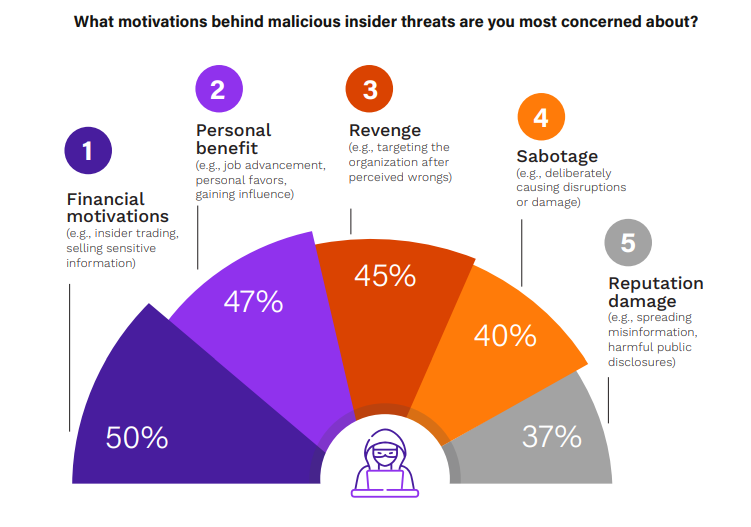
Image Credit: Motivations behind malicious insider threats from Cybersecurity Insiders report
Why do people do it? Money is the top reason—50% of cases. Others act for revenge (45%), personal benefit (47%), or just to cause chaos (40%). The scary part? Many start small and build up over weeks or months.
If you run a business in manufacturing, healthcare, finance, or tech, you face these risks daily. Even small companies with 50 employees can lose everything from one careless or angry worker. That’s where threat detection using behavioral AI comes in—it doesn’t wait for the big red flag. It notices the first tiny shift.
Learn more about different types of insider threats in our detailed guide here.
Why Old-School Security Tools Miss Insider Threats
Most companies still use signature-based tools. These match incoming files against a list of known viruses. Great for obvious malware from outside, but useless against someone who already belongs inside.
Rule-based systems create alerts for “if this, then that.” If someone downloads more than 100 files, send an alert. Sounds good, but real life isn’t that simple. Legitimate projects often involve big downloads. Result? Security teams drown in false alarms—thousands every week.
SIEM tools collect logs from everywhere but still need humans to connect the dots. By the time analysts notice a pattern, the damage is often done. Data has left the building.
Endpoint detection tools watch devices but struggle with “living off the land” attacks where insiders use built-in Windows tools like PowerShell.
The biggest weakness? These tools don’t understand normal human behavior. They can’t tell if the late-night login from the CFO is normal travel or something suspicious.
Threat detection using behavioral AI fixes this by building a unique profile for every user and device. It learns over time what “normal” looks like for each person. Then it flags only real deviations.
How Threat Detection Using Behavioral AI Actually Works
Think of behavioral AI like a super-smart security guard who remembers every employee’s daily habits.
Step 1: Baseline Creation The system watches everything for weeks or months. Login times, files opened, emails sent, apps used, even mouse movements and typing speed. It creates a digital fingerprint for each user.
Step 2: Continuous Monitoring Once the baseline is set, AI runs 24/7. It checks every action in real time across email, cloud storage, networks, and endpoints.
Step 3: Anomaly Detection When something doesn’t match the baseline, the AI scores it. Small changes get low scores. Big or repeated odd actions get high scores.
Step 4: Context and Correlation AI doesn’t stop at one alert. It connects dots. Did the unusual file download happen right after an angry email to the boss? Did the user log in from two countries at the same time? These patterns raise the risk score fast.
Step 5: Alert and Response High-risk events trigger alerts to the security team. Some systems even auto-block access or isolate the device until someone checks.
Modern systems use several AI types together:
- Machine Learning (ML): Spots patterns humans miss.
- Natural Language Processing (NLP): Reads emails and chat messages for tone changes—like sudden anger or secrecy.
- User and Entity Behavior Analytics (UEBA): Tracks not just people but also servers, apps, and devices.

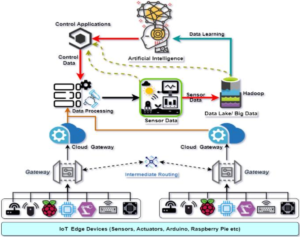
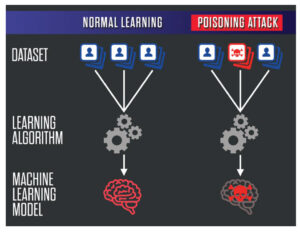
Image Credit: Anomaly detection flow diagram using machine learning from LinkedIn article by CloudPlusInfoTech
The beauty? It gets smarter every day. As more normal activity happens, baselines improve and false positives drop.
One real example: A contractor suddenly accesses engineering drawings at midnight from a new device. Traditional tools might ignore it. Behavioral AI sees this breaks three baselines—time, role, and device—and sends a high-priority alert before any data leaves.
Companies using threat detection using behavioral AI report catching threats weeks earlier than before.
Key Signals Behavioral AI Watches for Insider Threats
Behavioral AI looks at dozens of signals at once. Here are the most important ones:
- Access Pattern Changes
- User suddenly views files outside their department.
- Privilege escalation (asking for admin rights they never needed).
- Accessing data right before leaving the company.
- Unusual Login Behavior
- Logins from new locations or devices.
- Multiple failed attempts followed by success.
- Logins at odd hours that don’t match travel calendar.
- Data Movement
- Large downloads or uploads to personal cloud (Dropbox, personal email).
- Copying sensitive files to USB.
- Printing unusually large volumes.
- Communication Red Flags
- Emails with stressed language or mentions of money problems.
- Sharing credentials in chat.
- Sudden increase in external emails with attachments.
- Peer Comparison AI compares you to others in the same role. If every accountant downloads 5 reports a day but one downloads 50, that stands out.
- Device and Network Oddities
- Connecting to unknown external servers.
- Running unusual commands.
- High CPU usage at night when the user is offline.
These signals alone might seem small. But when three or four line up, the risk score shoots up.
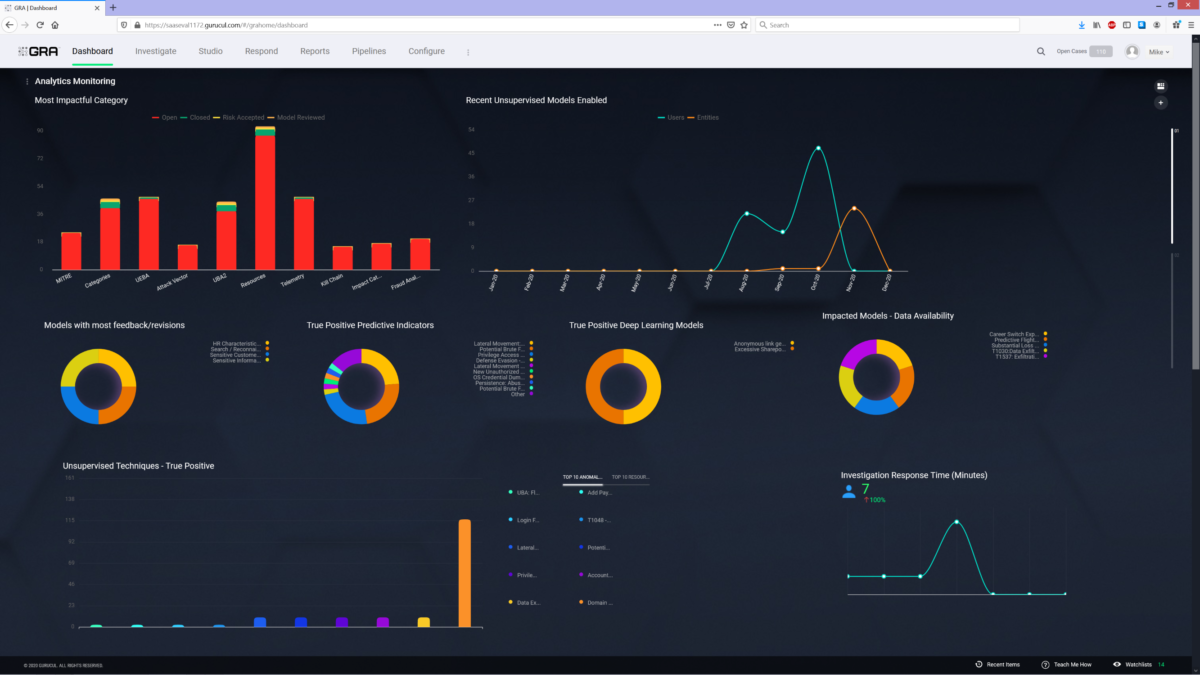
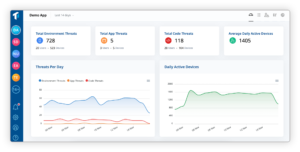
Image Credit: UEBA dashboard example from Gurucul (cybersecurity-excellence-awards.com)
Real companies have stopped major leaks this way. One tech firm caught an employee downloading customer databases after noticing late-night access plus unusual USB usage. The AI connected the dots in minutes.
Technologies Powering Modern Behavioral AI Systems
Not all behavioral AI is the same. Here’s what powers the best ones:
- Unsupervised Machine Learning: Learns without labeled examples. Perfect for finding brand-new attack styles.
- Supervised Models: Trained on past insider cases to recognize similar patterns.
- Deep Learning Neural Networks: Handle millions of data points and find complex relationships.
- Generative AI: Analyzes written communication for psychological clues like disgruntlement or intent to leave.
- Graph Analytics: Maps relationships between users, devices, and data to spot hidden connections.
Many platforms now combine these with big data from the cloud. They process terabytes of logs without slowing down your network.
Integration is key. Good systems plug into Microsoft 365, Google Workspace, AWS, Azure, Okta, and popular SIEM tools. No need to rip out your existing security stack.
For smaller businesses, cloud-based solutions mean you don’t need a huge IT team. The AI does most of the heavy lifting.
Real Benefits Organizations See Today
Companies that switched to threat detection using behavioral AI report clear wins:
- Faster Detection: Threats caught in hours instead of weeks or months.
- Fewer False Positives: Alert volume drops by 70-90% because the system understands context.
- Cost Savings: Less time wasted on fake alerts means security teams focus on real risks. Average insider incident cost drops dramatically.
- Better Compliance: Easy audit trails for GDPR, HIPAA, SOX, and other rules.
- Proactive Protection: Stops data leaks before they happen instead of cleaning up after.
- Improved Employee Trust: Privacy-friendly monitoring focuses on behavior patterns, not reading every email.
One healthcare provider reduced insider-related data breaches by 85% in the first year. A bank prevented a $2 million fraud attempt when AI flagged unusual transaction patterns from a compromised manager account.
See how leading platforms handle this at Darktrace’s insider threat page.
Another great resource is Abnormal Security’s breakdown of behavioral AI applications.
Case Studies: Threat Detection Using Behavioral AI in Action
Case 1: Global Tech Company A software firm with 10,000 employees noticed unusual activity. An engineer started accessing financial systems he had no reason to touch. Behavioral AI scored it high because:
- Role deviation (engineering to finance)
- Unusual time (weekend)
- Large data export attempt
Security reviewed within 30 minutes and found the account was compromised. They stopped the breach before any code or customer data left.
Case 2: Manufacturing Firm A plant manager began downloading blueprints late at night right before resigning. The AI noticed:
- Sudden spike in file downloads
- Access from personal laptop
- Correlation with exit interview scheduling
HR and security talked to the employee. Turns out he planned to take designs to a competitor. The company protected its intellectual property worth millions.
Case 3: Financial Institution AI spotted a trader sending unusually friendly emails to an external contact while downloading client lists. Language analysis showed stress markers. Investigation revealed coercion attempt by outsiders. The bank prevented regulatory fines and customer loss.
These aren’t made-up stories. Similar successes happen daily with tools from SentinelOne, Securonix, Gurucul, and others.
Read more real-world UEBA success stories here.
Challenges of Behavioral AI and How to Fix Them
No technology is perfect. Here are common hurdles and solutions:
Challenge 1: Privacy Concerns Employees worry about “being watched.” Fix: Be transparent. Explain the system protects everyone. Focus on patterns, not content. Get legal and HR buy-in early.
Challenge 2: Initial False Positives New systems need time to learn baselines. Fix: Start in monitoring-only mode for 4-6 weeks. Fine-tune with your own data.
Challenge 3: Integration Complexity Connecting to all your tools. Fix: Choose platforms with pre-built connectors for popular systems.
Challenge 4: Skill Gap Teams need to understand AI alerts. Fix: Pick user-friendly dashboards with plain-English explanations. Train staff or use managed services.
Challenge 5: Cost Seems expensive at first. Fix: Calculate ROI from prevented incidents. Most companies see payback in under 12 months.
With careful planning, these challenges become manageable.
Step-by-Step Guide to Implement Threat Detection Using Behavioral AI
Ready to start? Follow these steps:
- Assess Your Current Setup (Week 1) List all systems that generate logs—email, cloud storage, endpoints, network, HR system. Identify high-risk departments.
- Define Goals (Week 2) What matters most? Data exfiltration? Privilege abuse? Compliance? Set clear KPIs like “reduce mean time to detect by 50%.”
- Choose the Right Solution (Weeks 3-4) Look for:
- Real-time monitoring
- Easy integration
- Low false positives
- Good reporting Popular options include Darktrace, SentinelOne, Gurucul REVEAL, and Proofpoint.
- Pilot Program (Weeks 5-8) Start with one department. Monitor only—no auto blocks. Review alerts weekly.
- Full Rollout (Month 3) Expand company-wide. Connect all data sources.
- Train Your Team (Ongoing) Run workshops. Create playbooks for different alert types.
- Review and Improve (Every Quarter) Check accuracy. Update baselines as roles change. Add new data sources.
Many vendors offer free trials or proof-of-concept projects. Take advantage.
Compare top UEBA tools in our latest roundup.
Best Practices to Get Maximum Value
- Combine behavioral AI with human oversight. AI flags, people decide.
- Update baselines regularly when people change jobs or new tools arrive.
- Share high-level insights with leadership—show ROI numbers.
- Test with simulated insider scenarios every few months.
- Keep data secure—encrypt everything and limit who sees raw logs.
- Document everything for audits.
Follow these and your program will stay strong for years.
The Future of Threat Detection Using Behavioral AI
2026 and beyond look exciting—and a bit challenging.
AI agents (autonomous software helpers) will become common. They’ll have their own “behavior” to monitor. New insider threats could come from compromised AI agents.
Generative AI will make detection even better by understanding human intent from writing and voice.
We’ll see more “explainable AI” that tells security teams exactly why it flagged something.
Zero-trust models combined with behavioral AI will become standard—no one gets automatic trust.
Cloud-native solutions will dominate, making deployment faster for everyone.
Organizations that start now will have a huge advantage as threats evolve.
Explore emerging AI cybersecurity trends.
Conclusion
https://cybershieldguide.com/Threat detection using behavioral AI isn’t just another security tool. It’s a complete shift in how we protect organizations—from reacting to attacks to preventing them by understanding normal human and machine behavior.
It catches what other tools miss. It reduces noise so your team stays focused. And it scales as your business grows.
Whether you’re a small business owner worried about data leaks or a security leader at a large enterprise, now is the time to explore behavioral AI. Start small, measure results, and watch your risk drop.
The insiders of tomorrow won’t succeed if you use the right technology today.
Frequently Asked Questions About Threat Detection Using Behavioral AI
1. How long does it take to set up behavioral AI? Most companies see basic protection in 4-8 weeks. Full optimization takes 2-3 months as the system learns your unique patterns.
2. Is behavioral AI expensive? Pricing varies, but many cloud solutions start under $10 per user per month. The money saved from prevented breaches usually pays for it quickly.
3. Does it invade employee privacy? Good systems focus on patterns and risk scores, not reading personal emails. Clear policies and transparency help everyone feel comfortable.
4. Can small businesses use it? Yes! Several vendors offer simple setups perfect for companies with under 500 employees.
5. What if the AI makes mistakes? All systems have some false positives at first, but they drop fast. Human review always has the final say.
6. How does it handle remote workers? Perfectly. It tracks behavior across devices and locations, so VPNs and home offices are fully covered.
7. Does it work with existing antivirus and firewalls? Yes. It complements them by adding the behavioral layer they lack.
8. What data does the system need? Logs from Active Directory, email servers, cloud apps, endpoints, and network traffic. The more sources, the better it performs.
9. Can it predict threats before they happen? Advanced systems spot early warning signs like rising stress in communications or gradual access creep.
10. Where can I learn more or get a demo? Check vendors like SentinelOne, Darktrace, or contact us for recommendations tailored to your industry.
Share this content:






Post Comment