Smishing & Vishing Attacks
You’re sitting at home, phone in hand, when a text arrives: “Your Amazon package is delayed. Click here to reschedule delivery.” It looks real. The logo is there. Your heart skips a beat because you’re expecting something important. Before you know it, you tap the link and… trouble starts.
Or the phone rings. A calm voice says, “This is Raj from your bank. We noticed unusual activity on your account. Can you confirm your card details to secure it?” The caller ID shows your bank’s number. You trust it. You start talking.
These are smishing & vishing attacks – two of the fastest-growing cyber threats in 2026. Smishing comes through text messages. Vishing comes through voice calls. Together, they trick millions of people every month into giving away passwords, money, or access to their devices.
In 2026, these attacks feel more personal than ever. Attackers use AI to clone voices, copy real company logos, and time their messages perfectly. But here’s the good news: once you know exactly what to look for and what to do, you can stay safe. This guide walks you through everything in plain, everyday language so you and your family can protect yourselves right now.
Table of Contents
- What Exactly Are Smishing & Vishing Attacks?
- Why Smishing & Vishing Attacks Are Exploding in 2026
- Real Stories: How Ordinary People Got Hit
- How to Spot a Smishing Text in Seconds
- How to Spot a Vishing Call Before You Say a Word
- Simple Steps to Stop Smishing & Vishing Attacks Cold
- What to Do If You’ve Already Clicked or Shared Info
- What’s Coming Next – and How to Stay Ahead
- Frequently Asked Questions
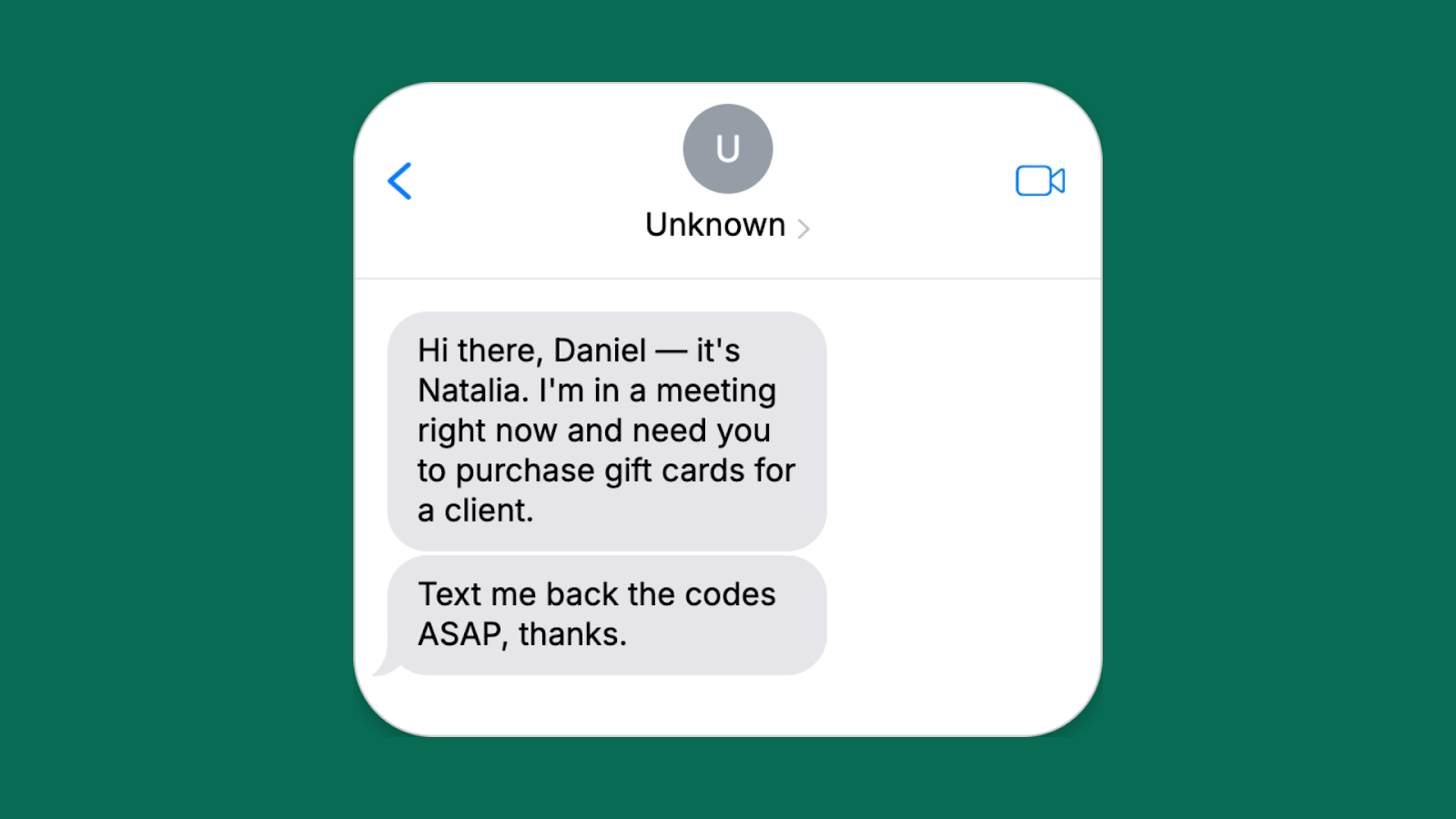
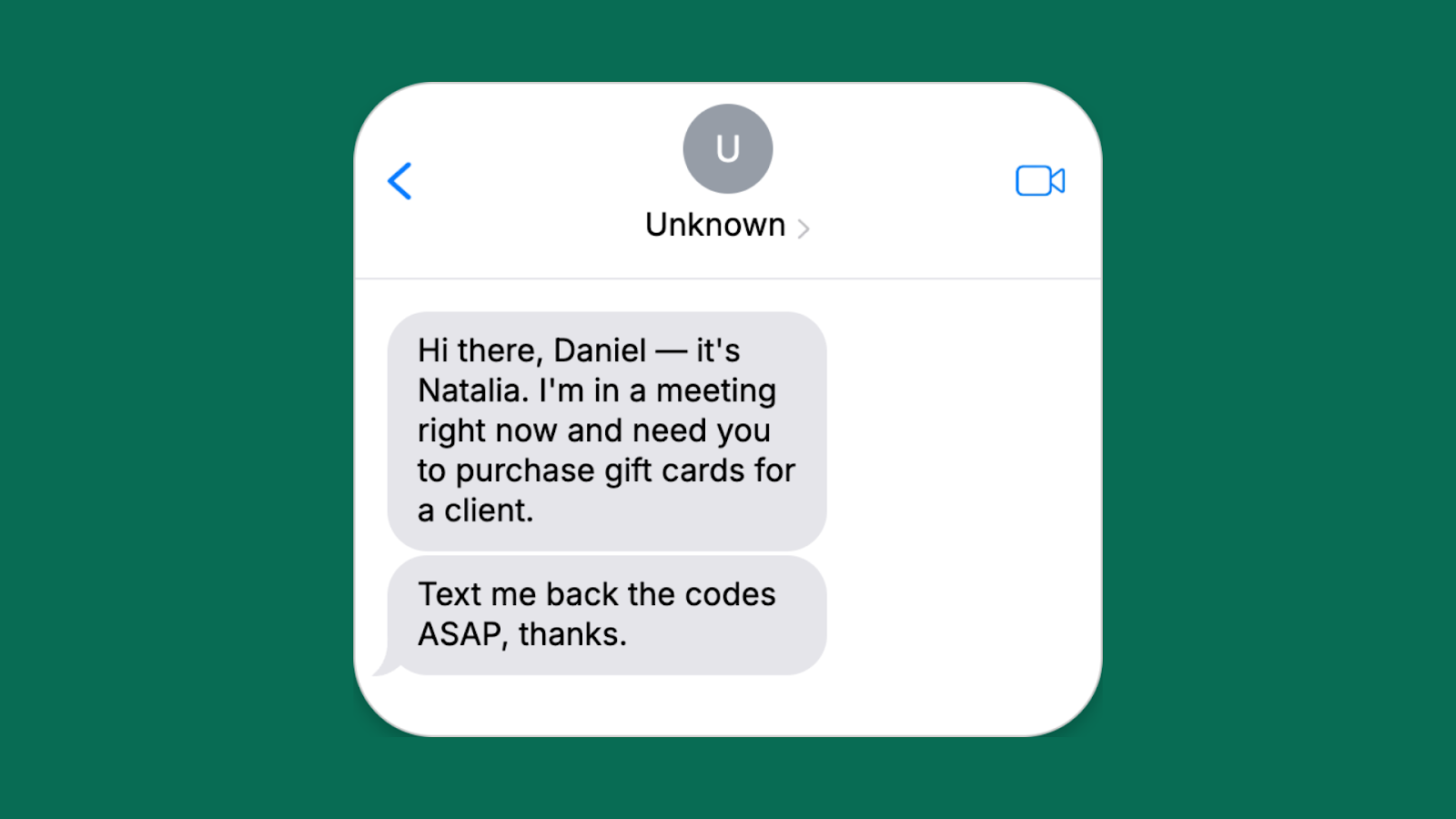
Image: Real example of a smishing text pretending to be from a colleague. Credit: Adaptive Security
What Exactly Are Smishing & Vishing Attacks?
Let’s break it down simply.
Smishing is phishing that arrives as a text message (SMS) or through apps like WhatsApp. The word comes from “SMS” + “phishing.” Attackers send you a short message that creates urgency or fear or excitement. It might say your bank account is locked, your tax refund is ready, or a friend needs money right away. The goal? Get you to click a bad link, reply with personal details, or call a fake number.
Vishing is voice phishing. Someone calls you (or leaves a voicemail) pretending to be from a trusted place – your bank, the police, tech support, even a family member in trouble. They sound official. They use pressure tactics like “Do this now or lose everything.” The word comes from “voice” + “phishing.”
Both are types of social engineering. They don’t hack your phone with fancy code first. They hack your trust. And in 2026 they work together. A smishing text might say “Call this number to fix your account,” leading straight into a vishing call.
The big difference from old-school email phishing? Texts and calls feel more immediate. You’re more likely to act fast on your phone while walking, driving, or cooking dinner. That’s why smishing click rates are now 19-36% – up to nine times higher than email.
Why Smishing & Vishing Attacks Are Exploding in 2026
Numbers don’t lie, and the numbers in 2026 are scary but eye-opening.
Global smishing incidents jumped 18% in 2024 and kept climbing through 2025. One report showed a 328% spike in certain regions. A staggering 76% of businesses got hit by smishing texts last year. Click-through rates on malicious texts hit 36% in some campaigns – people simply trust texts more than emails.
Vishing grew even faster. One major threat report recorded a 442% surge in vishing operations in late 2024 that carried into 2025. Deepfake voice attacks exploded by over 1,600% in the first three months of 2025 alone. Attackers now clone a person’s voice with just three seconds of audio from a social media video or podcast.
Why the boom?
- Everyone lives on their phones. Banking apps, delivery tracking, ride-sharing – everything happens on mobile.
- AI makes attacks cheap and easy. Tools that create realistic voices or perfectly written texts cost almost nothing on the dark web.
- Short codes and spoofed numbers look legitimate.
- People are busier than ever. A quick text during lunch feels harmless.
- Toll-road scams, delivery alerts, and “your package needs confirmation” messages exploded because they tie into real-life routines.
The World Economic Forum’s 2026 report found that 73% of business leaders knew someone personally affected by cyber fraud involving phishing, smishing, or vishing in 2025. These aren’t just “tech people” problems anymore. They hit grandparents, college students, small shop owners, and big company CEOs alike.
Image: Mobile phone protected by a cybersecurity shield. Credit: VectorStock
Real Stories: How Ordinary People Got Hit
Story 1: The Toll Road Trap In 2025, the “Smishing Triad” group sent millions of texts pretending to be from state toll services. “You have an unpaid toll of ₹450. Pay now to avoid penalty: [link]”. Thousands clicked. The group made over $1 billion worldwide from these simple texts. One victim in Jharkhand lost ₹28,000 before realizing the link installed malware that emptied his linked bank account.
Story 2: The Deepfake Boss Call A finance manager at a mid-sized company in Mumbai received a call. The voice was perfect – it was his CEO’s exact tone and accent. “We have an emergency acquisition. Transfer ₹1.2 crore to this account right now. Don’t tell anyone yet.” The manager did it. The company lost the money. The voice? Cloned from a 12-second LinkedIn video.
Story 3: The “Grandkid in Trouble” Vishing An elderly couple in Delhi got a call from a young man sounding exactly like their grandson. “Dadi, I had an accident. I’m in police station. Send ₹50,000 on this number for bail. Please don’t tell Mom.” They transferred the money. Later they learned their grandson was safe at college.
Story 4: The Fake Delivery Smish A working mom received: “Your Swiggy order #98765 is delayed due to address issue. Confirm here.” She clicked. The link asked for her UPI PIN “to verify.” She lost ₹18,000 in minutes.
These aren’t rare. They happen every single day in 2026. The attackers don’t need to be genius hackers. They just need you to act before you think.
How to Spot a Smishing Text in Seconds
Train your eyes. Here are the clear red flags that appear in almost every smishing attack in 2026:
- Unknown or slightly wrong sender – It says “Amazon” but the number is random. Real companies use short codes like 56789 or verified names.
- Urgency or fear – “Act within 24 hours or account suspended.” “Your package will be returned.” “Security alert – login now.”
- Requests for personal info – Never legitimate. Banks never ask for full card number, CVV, OTP, or UPI PIN via text.
- Shortened or weird links – Hover (or long-press) before clicking. If it doesn’t match the real website, delete.
- Unexpected “rewards” or problems – You didn’t enter any contest but won ₹5 lakh? You didn’t order but a package is waiting?
- Poor grammar or odd Hindi-English mix that doesn’t match the brand’s usual style.
- Asks you to call a number or reply with details – Real companies don’t do this via text.
Pro tip: If you’re not 100% sure, don’t click anything. Open your actual app or website manually and check there.
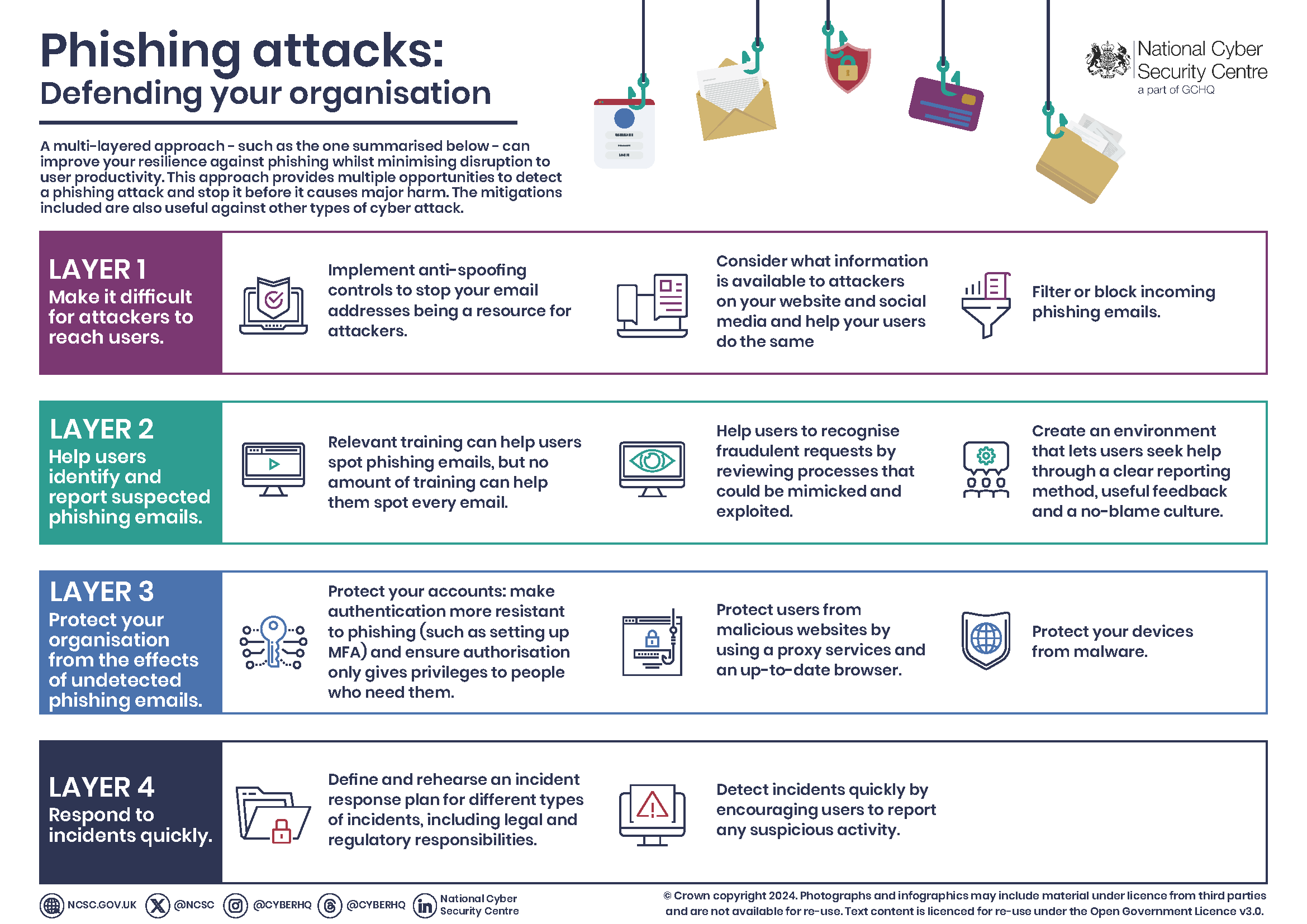
Image: Multi-layer defense infographic against phishing attacks. Credit: NCSC.GOV.UK
How to Spot a Vishing Call Before You Say a Word
Vishing feels harder to spot because it’s live conversation. But these signs almost always appear:
- Caller ID spoofing – It shows your bank, but banks rarely call asking for details.
- Pressure to act now – “We need to fix this immediately or money will be lost.”
- Refusal to give callback number – They say “I can’t give you my extension” or push you to stay on the line.
- Asks for verification codes – Never share OTPs or MFA codes over phone. Legit companies never ask.
- Background noise that sounds fake or too perfect (deepfake voices sometimes have tiny robotic pauses).
- Emotional manipulation – Pretending to be family in distress, police, or “helping you avoid fraud.”
Golden rule for 2026: Hang up and call back using the official number from their website or your statement. Never use the number they gave you.
Simple Steps to Stop Smishing & Vishing Attacks Cold
You don’t need to be a tech expert. These everyday habits cut your risk by 90% or more.
For Everyone (Personal Protection)
- Never click links in texts or answer calls asking for personal details. Go to the real website yourself.
- Use app-based authenticator (like Google Authenticator) instead of SMS for 2-factor codes. SMS can be intercepted.
- Enable spam filters on your phone. On Android and iPhone, turn on “Filter unknown senders.”
- Keep your phone updated. Updates patch security holes that attackers love.
- Set a SIM PIN and talk to your mobile provider about port-out protection to stop SIM-swap attacks.
- Use a password manager and never reuse passwords.
- Install reputable security apps that scan links and block scam calls (many free options exist).
For Families and Seniors
Teach kids and parents the “Stop, Think, Verify” rule. Make it a game: “If a message scares you or excites you too much, show me first.”
For Businesses and Employees
- Train staff monthly with real-looking smishing and vishing simulations (many companies offer this).
- Never let one person approve large transfers alone. Use dual approval.
- Use enterprise tools that scan incoming texts and calls.
- Create a “no shame” reporting culture – reward people who report suspicious messages.
Tools Worth Using in 2026
- Truecaller or similar for call blocking (updated versions now detect AI voices better).
- Google or Apple built-in scam detection.
- Browser extensions that warn before visiting bad links.
- Password managers with breach alerts.

Image: Illustration of AI deepfake voice technology. Credit: Lowy Institute
What to Do If You’ve Already Clicked or Shared Info
Don’t panic. Quick action saves most situations.
- Disconnect from internet/Wi-Fi immediately if you clicked a link.
- Change passwords for any accounts you might have exposed – start with email and banking.
- Contact your bank or payment app right away. Many can freeze transactions.
- Enable credit monitoring or place a fraud alert.
- Report it:
- Forward smishing texts to 7726 (SPAM) in India.
- Report to FTC at ReportFraud.ftc.gov (international complaints accepted).
- File complaint at cybercrime.gov.in.
- Tell your mobile provider.
- Scan your phone with updated security software.
- Watch statements for 30 days.
Most banks refund money lost to verified fraud if you report quickly.
What’s Coming Next – and How to Stay Ahead
In late 2026 and 2027, expect even more AI. Video calls with deepfake faces, WhatsApp voice notes that sound exactly like your boss, and “quishing” (QR code phishing) mixed with smishing.
But the defense stays the same: slow down, verify independently, and never share sensitive info when someone else starts the conversation.
Businesses will move to passwordless logins and behavioral biometrics (the way you type or hold your phone). Individuals will rely more on app-based everything instead of SMS.
The attackers will keep evolving, but so will protection tools. Stay curious and keep learning.
Frequently Asked Questions About Smishing & Vishing Attacks
Can smishing infect my phone just by opening the text? No. You have to click the link or download something. Just reading is safe.
Do banks ever call or text asking for OTP? Never. Legitimate banks never ask for full OTP or PIN over phone or text.
What if the caller knows my full name and last four digits of my card? They bought that info from data breaches. It’s common now. Don’t trust them.
Is it safe to reply “STOP” to scam texts? No. Replying confirms your number is active. Just delete and block.
Should I use the same password everywhere? Absolutely not. One breach opens everything. Use a password manager.
Are government agencies calling about taxes or refunds via phone? They send official letters first. Never trust surprise calls.
How do I protect my parents who aren’t tech-savvy? Set up family sharing for security alerts, use simple rules like “Never click, always ask me first,” and enable auto spam blocking.
Smishing & vishing attacks will keep coming in 2026, but they only win when we rush. Take that extra 10 seconds to verify and you win every time.
Share this guide with your family, colleagues, and WhatsApp groups. The more people know, the fewer victims there will be.
Stay safe out there. Your future self (and your bank balance) will thank you.
External Resources
- FTC Guide: How to Recognize and Avoid Phishing Scams
- CISA: Avoiding Social Engineering and Phishing Attacks
- Report Fraud to FTC
- Indian Cyber Crime Reporting Portal
Share this content:



Post Comment