Secure Coding Practices to Block AI Generated Vulnerabilities

AI tools are everywhere in coding these days. Developers use them to write functions in seconds, fix bugs quickly, and even build entire features. But here’s the truth: these same tools often create hidden security holes that traditional code reviews might miss. Studies show that up to 45-62% of AI-generated code contains serious flaws like missing checks or weak protections.
That’s why secure coding practices to block AI generated vulnerabilities matter more than ever. They help you enjoy the speed of AI without opening doors to hackers. This guide explains everything in simple steps. You’ll find clear explanations, real examples, and practical tips that work for any team – from solo freelancers to big companies.
By the end, you’ll know exactly how to review AI suggestions, spot risks early, and build safer software. Let’s get started.

Image credit: SecureFlag blog – Secure lock protecting AI code flows
What Exactly Are AI Generated Vulnerabilities?
AI generated vulnerabilities are security weaknesses that sneak into your code when you use tools like Copilot, Claude, or Gemini. The AI doesn’t mean to cause harm. It learns from millions of public code examples online. Many of those examples have old bugs or shortcuts that worked in the past but fail today.
Common problems include:
- Forgetting to check user input before using it in a database query
- Hardcoding secret keys or passwords right in the code
- Using outdated libraries that have known fixes available
- Creating complex logic that looks smart but leaves gaps for attacks
One big reason this happens is context. AI doesn’t know your full project rules or the specific threats your app faces. It might suggest code that works fine in a simple test but breaks in a real app with thousands of users.
Another issue is speed. AI spits out code so fast that teams sometimes accept it without deep checks. A recent report from Veracode found AI code fails secure benchmarks nearly half the time. That’s a huge jump compared to human-written code.
These vulnerabilities aren’t new types. They are the same old problems – SQL injection, cross-site scripting (XSS), broken access control – but they appear more often and in sneaky ways because AI “hallucinates” or copies flawed patterns.
If left unchecked, they can lead to data leaks, stolen user info, or even full system takeovers. But with the right secure coding practices to block AI generated vulnerabilities, you can catch them before they reach production.
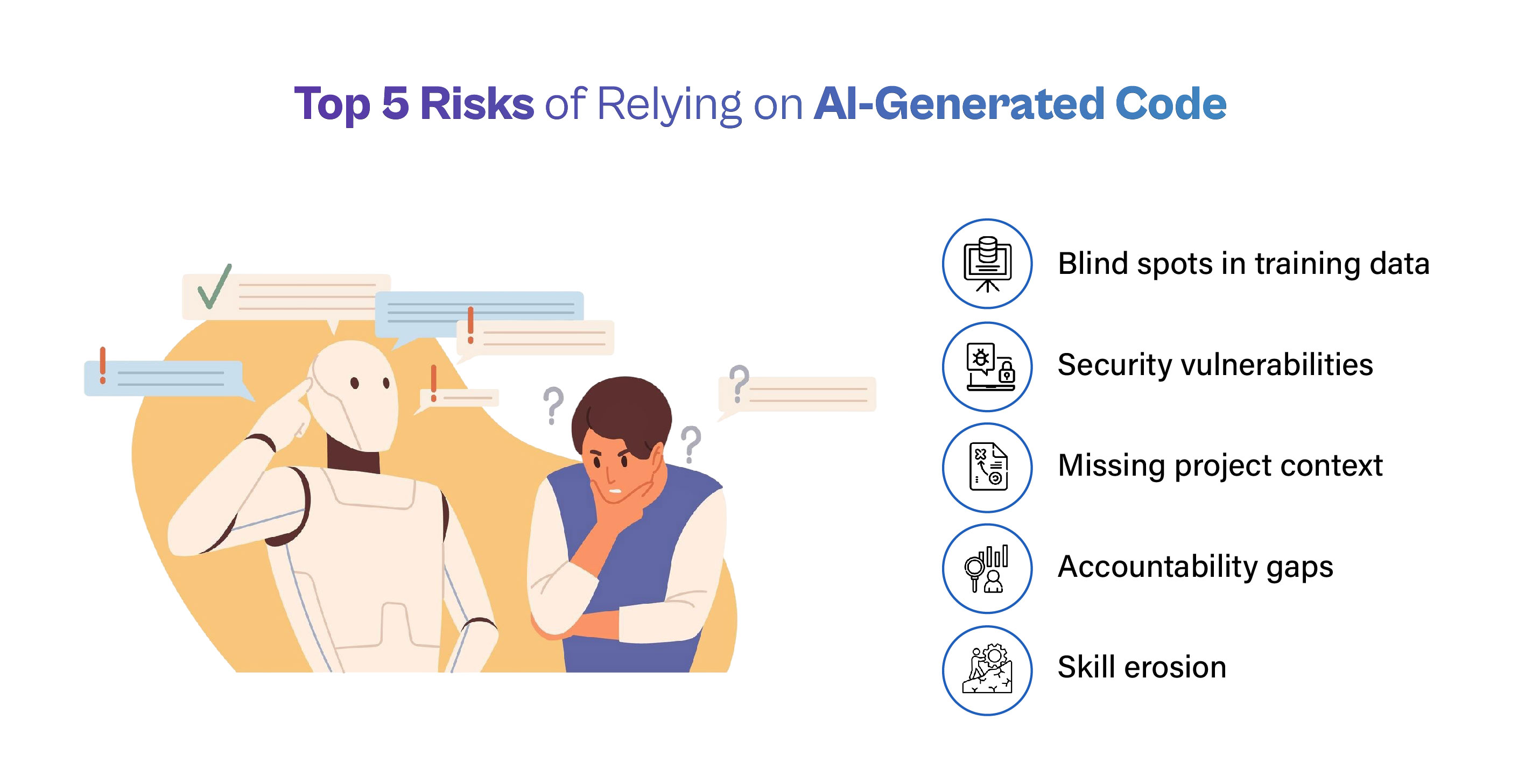
Image credit: The Cube Research – Top risks of relying on AI-generated code
Why the Threat Is Growing Fast
Think about how development has changed. Five years ago, a developer might write 50 lines of code a day after careful planning. Now, AI can generate hundreds in minutes. Velocity goes up 4x or more, but so do risks – one study showed a 10x increase in vulnerabilities shipped to production.
Real companies have felt the pain. Teams using AI heavily saw privilege escalation paths jump 322% and design flaws rise 153%. Secrets like API keys appeared 40% more often in AI-assisted projects.
The problem grows because AI training data includes tons of insecure examples from GitHub repos, Stack Overflow answers, and old tutorials. When you ask for “quick login code,” the model might pull from a source that skips modern protections.
Plus, AI lacks your team’s security culture. It doesn’t remember that last quarter your app faced a specific attack type. It just completes the pattern you started.
This is exactly why secure coding practices to block AI generated vulnerabilities have become a must-have skill. Ignoring them means racing ahead but leaving your app wide open.
Traditional Secure Coding Falls Short in the AI Era
Old rules like “always validate input” still apply, but they aren’t enough alone. Why? AI code often looks clean and passes basic tests. A function might compile perfectly yet miss a critical authorization check.
Human developers naturally think about edge cases because we understand the big picture. AI focuses on the prompt you gave it. If your prompt says “make a user profile page,” it might forget to protect admin fields.
Another gap: volume. When AI floods your pull requests with code, manual reviews get tiring. Reviewers skim instead of digging deep. Fatigue leads to missed issues.
That’s the shift. Secure coding practices to block AI generated vulnerabilities add extra layers – automated scans right in your editor, special prompts that force security, and workflows that assume AI output needs extra proof before trust.
Core Secure Coding Practices to Block AI Generated Vulnerabilities
Here are the proven practices that work best today. Each one targets how AI creates risks and gives you simple ways to fight back.
1. Use Smart Prompts That Demand Security First
Start every AI session with clear security instructions. Instead of “write a login function,” say “write a login function that validates all input, uses parameterized queries, hashes passwords properly, and never logs sensitive data.”
This technique is called secure prompt engineering. It tells the AI exactly what rules to follow. Many teams create template prompts they copy-paste for common tasks.
Why it blocks AI issues: The model then generates code that already includes protections instead of leaving them out. Studies show well-crafted prompts cut insecure outputs by a big margin.
Tip: Keep a shared document with 10-15 ready templates for your team. Update them when new threats appear. Link this to our guide on effective AI prompting for developers.
2. Always Validate and Clean Every Input
Never trust data coming from users, APIs, or even other parts of your system. Check length, format, and allowed characters before using it.
AI often skips this step because its training examples sometimes do too. You might get code that directly uses form data in a database call.
Simple fix: Build a central validation helper that every function calls. For web apps, use libraries that handle common checks automatically.
Benefits: Stops injection attacks cold. Even if AI forgets, your layer catches it.
Do this every time you accept AI code. Ask: “Does every input path have checks?” If not, add them.
3. Set Up Strong Authentication and Access Controls
Make sure only the right people can do the right things. AI code might create endpoints that anyone can reach or skip role checks.
Practice: Use established frameworks that handle login, sessions, and permissions safely. Turn on multi-factor authentication everywhere possible.
For AI-generated parts, double-check that admin routes require extra proof. Never let AI decide access rules without your review.
This practice directly blocks privilege escalation – one of the fastest-growing AI risks.
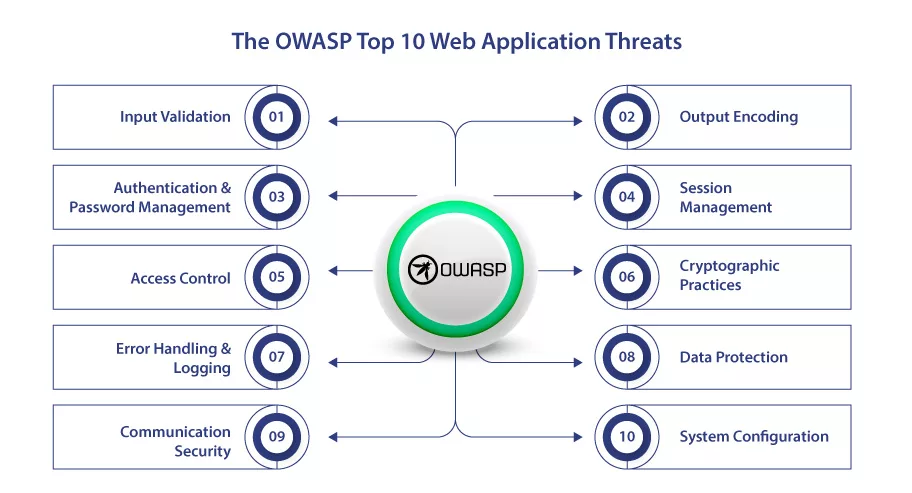
Image credit: SignMyCode – OWASP Top 10 overview with secure practices
4. Handle Errors Without Giving Away Secrets
Error messages should say “something went wrong” not “database query failed because of user ID 12345”.
AI sometimes includes full stack traces or database details in responses. That’s a goldmine for attackers.
Rule: Catch errors early, log them privately with details, and show users only friendly messages. Use consistent error codes internally.
Test this by forcing errors in AI code and seeing what leaks.
5. Keep Dependencies Clean and Updated
AI loves suggesting the latest trendy packages, but many have hidden vulnerabilities or are abandoned.
Always scan new dependencies with tools that check for known issues. Keep an approved list of safe libraries. Remove anything not on the list.
Create a software bill of materials (SBOM) so you know exactly what’s in your project. Update weekly, not when something breaks.
This stops supply chain attacks that AI can accidentally introduce.
6. Protect Data at Rest and in Motion
Encrypt sensitive information both when stored and when sent over the internet. Use strong algorithms and proper key management.
AI code might store passwords in plain text or send data without HTTPS. Review every storage and network call.
Simple habit: Use environment variables for secrets instead of hardcoding. Never let AI put real keys in code.
7. Follow Established Secure Coding Standards
Pick one standard like OWASP or CERT and stick to it. Share it with your team and require AI code to match.
For example, OWASP’s quick reference covers input validation, output encoding, session management, and more. Print the checklist and keep it visible.
When AI suggests code, run it against the checklist before merging.
Read the full OWASP Secure Coding Practices Quick Reference Guide – it’s free and practical.
8. Review Every Line of AI Code Carefully
Treat AI output like code from a junior developer who needs mentoring. Look for:
- Missing checks
- Overly complex parts
- Hardcoded values
- Unusual patterns
Use pair programming for big AI-generated chunks. One person writes the prompt, another reviews the result.
Many teams now mark AI code with comments like “// AI generated – reviewed on [date]” for tracking.
Image credit: Microsoft .NET Blog – Developer reviewing AI-generated code
9. Test Thoroughly with Security in Mind
Run unit tests, integration tests, and security-specific scans. Tools that simulate attacks (fuzzing) work great on AI code because they find edge cases the AI missed.
Automate scans in your pipeline so nothing reaches production without passing.
Include tests that specifically target common AI weaknesses like missing validation.
10. Scan Continuously with Modern Tools
Use static analysis (SAST), dependency scanning (SCA), and secret detection right in your IDE. Many free or low-cost options exist that flag issues as you type.
Popular choices include Snyk, Checkmarx, and GitHub’s built-in tools. They understand AI patterns and catch things humans might overlook after long review sessions.
Set rules that block merges if high-severity issues appear.
Image credit: SlideTeam – Code security checklist template
These ten practices form the foundation of secure coding practices to block AI generated vulnerabilities. Apply them together for best results.
Building a Full Secure Workflow for AI Coding
Here’s how top teams put it all together:
- Start with secure prompt templates
- Generate code in a separate branch
- Run automatic scans immediately
- Human review using checklist
- Add security tests
- Merge only after all green lights
This workflow keeps speed high while security stays strong. It takes minutes extra per feature but saves weeks of cleanup later.
Many companies now require “AI security approval” before big changes – just like code reviews.
Examples of Teams Getting It Right
One mid-size fintech company saw vulnerabilities drop 70% after adding IDE scans and prompt templates. Their AI usage went up, but risk went down.
A web agency used dependency allow-lists and caught several hallucinated packages before they caused issues.
These stories show secure coding practices to block AI generated vulnerabilities deliver real wins.
Tools That Make Life Easier
- IDE plugins: Catch issues while typing
- CI/CD scanners: Block bad code automatically
- SBOM generators: Track every piece
- Prompt libraries: Share best starters
Free starters: GitHub Advanced Security, Snyk Free tier, OWASP ZAP for testing.
Explore more in our tool roundup for secure dev teams.
Common Mistakes to Skip
- Blindly copying AI code without reading
- Assuming “it works” means “it’s secure”
- Using public AI tools with company secrets
- Skipping updates because “AI will fix it later”
Avoid these and you’ll stay ahead.
Looking Ahead: The Future of Secure AI Coding
New frameworks like Cisco’s Project CodeGuard add rules directly into AI tools. Guardrails will become standard. Training will include “AI security” modules.
But the basics – validation, reviews, testing – will always matter. Secure coding practices to block AI generated vulnerabilities will evolve but stay rooted in good habits.
Your Action Checklist
- Create 5 secure prompt templates today
- Add one scanner to your IDE this week
- Review your last 3 AI features against the OWASP list
- Share this post with your team
Small steps lead to big protection.
Secure coding practices to block AI generated vulnerabilities aren’t extra work – they’re smart work. They let you use AI’s power safely and build apps users can trust.
Start applying these ideas on your next project. Your future self (and your users) will thank you.
Have questions or success stories? Drop a comment below. For more on keeping code safe in the AI age, check our related posts:
- Input Validation Made Simple
- Understanding OWASP Top 10 for Modern Apps
- Dependency Management Best Practices
Stay secure and keep coding smart!
Share this content:






Post Comment