Cloud-Native Security Architectures
In today’s digital world, businesses are moving their operations to the cloud faster than ever. This shift brings incredible benefits like scalability and flexibility, but it also opens up new risks. That’s where cloud-native security architectures come in. These are designed to protect applications built specifically for cloud environments, ensuring data stays safe amid constant changes. If you’re running apps on platforms like AWS, Azure, or Google Cloud, understanding these architectures is key to avoiding breaches and keeping everything running smoothly.
Cloud-native security architectures focus on integrating protection right from the start. Instead of bolting on security later, it’s woven into the design of microservices, containers, and serverless setups. This approach helps teams respond quickly to threats while maintaining performance. According to experts, traditional security methods just don’t cut it anymore because cloud apps are dynamic and distributed.
In this post, we’ll explore what makes these architectures tick, the challenges they address, and practical ways to implement them. Whether you’re a developer, IT manager, or business owner, you’ll find actionable insights here. For more on basic cloud concepts, check out our guide on cloud computing fundamentals.
Table of Contents
- What Does Cloud-Native Mean?
- The Need for Specialized Security in Cloud-Native Environments
- Core Elements of Cloud-Native Security Architectures
- The Four C’s Framework: A Structured Approach
- Best Practices for Implementing Cloud-Native Security
- Popular Tools and Technologies
- Real-World Case Studies
- Emerging Trends in Cloud-Native Security
- Conclusion
What Does Cloud-Native Mean?
Before diving into security, let’s clarify what cloud-native really is. Cloud-native applications are built to take full advantage of cloud computing. They use technologies like microservices, where an app is broken into small, independent parts that communicate over networks. This makes updates easier and scaling simpler.
Containers are another big piece. Think of them as lightweight packages that hold everything an app needs to run, from code to libraries. Docker is a popular tool for creating these containers. Then there’s orchestration, often handled by Kubernetes, which manages how these containers are deployed and scaled across servers.
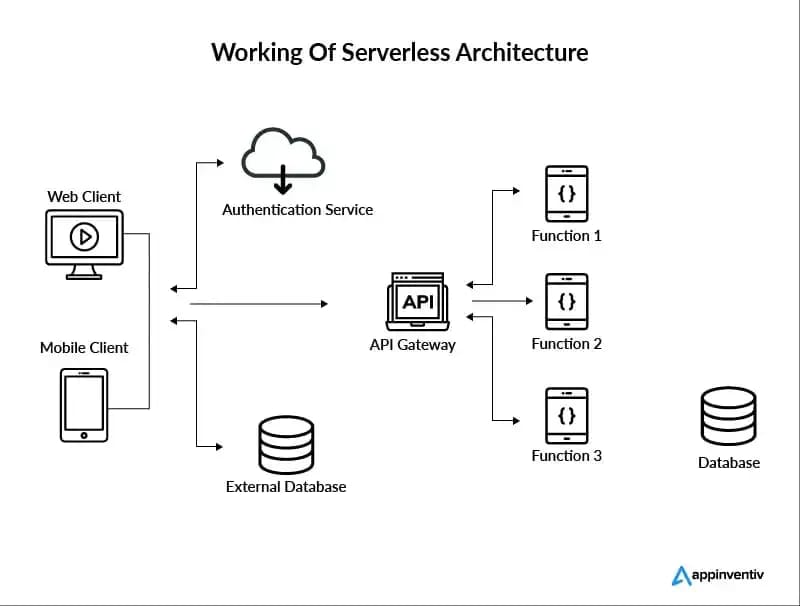
Serverless computing is also part of the mix, where you don’t manage servers at all—providers like AWS Lambda handle that. You just write code for specific functions, and it runs on demand.
All this creates agile systems, but it also means more moving parts. Traditional apps sat on single servers with clear boundaries, but cloud-native ones are spread out, making them harder to secure. For a deeper look at container basics, see our post on getting started with Docker.
Cloud-native setups allow for continuous integration and delivery (CI/CD), where code changes are tested and deployed automatically. This speed is great for business, but without proper checks, it can introduce vulnerabilities. Organizations like the Cloud Native Computing Foundation (CNCF) provide resources on these topics—check out their site for more details: CNCF.io.
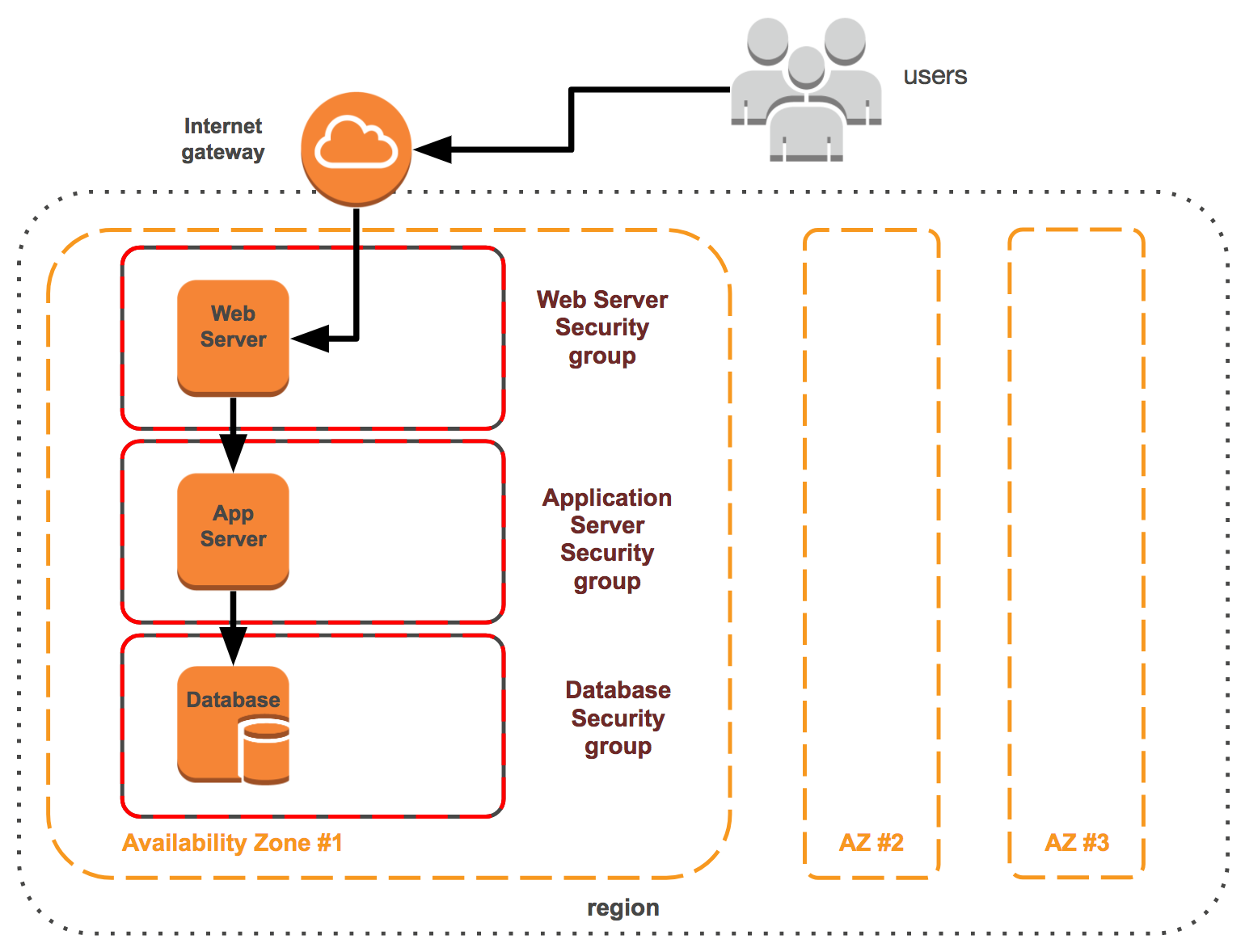
Image credit: subscription.packtpub.com
The Need for Specialized Security in Cloud-Native Environments
Why can’t old-school security work here? In legacy systems, you had firewalls around the perimeter, but in the cloud, there’s no fixed perimeter. Apps scale up and down, containers spin up and die quickly, and traffic flows through APIs constantly. This dynamism creates blind spots.
Common threats include misconfigurations, where someone accidentally leaves a database exposed. Supply chain attacks, like tampering with code dependencies, are rising too. And with remote work, insider threats or stolen credentials can lead to big problems.
Data from reports shows that over 80% of breaches involve cloud misconfigurations. That’s why cloud-native security architectures emphasize proactive measures. They shift security “left,” meaning it’s part of development from day one, not an afterthought.
Zero-trust is a core idea here: assume nothing is safe, verify everything. This contrasts with trusting internal networks blindly. Implementing it reduces risks significantly.
Also, compliance matters. Regulations like GDPR or HIPAA require strong data protection, and cloud-native designs must bake that in. For tips on compliance, read our article on cloud compliance strategies.
Core Elements of Cloud-Native Security Architectures
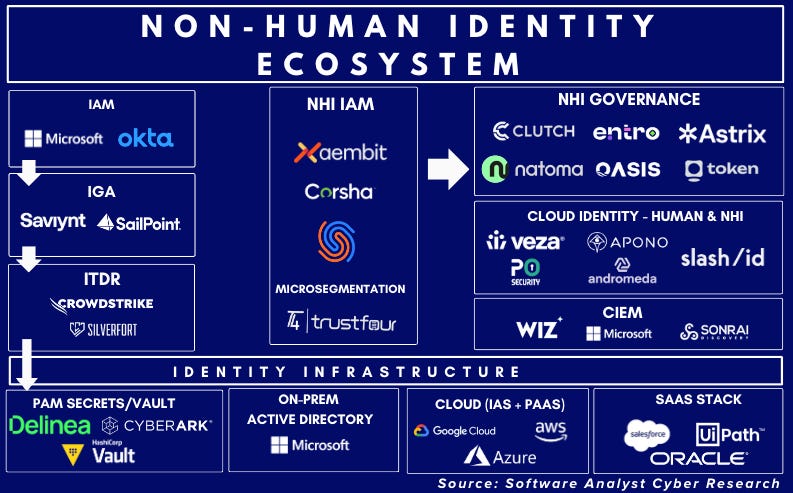
Let’s break down the building blocks. First, identity and access management (IAM). This controls who can do what. In cloud-native, use role-based access control (RBAC) to give minimal permissions. Tools like AWS IAM or Azure AD help enforce this.
Next, network security. With microservices talking constantly, segment networks to limit blast radius if one part is compromised. Use service meshes like Istio for encrypted communication.
Encryption is non-negotiable. Encrypt data at rest and in transit. Cloud providers offer built-in tools, but manage keys carefully to avoid leaks.
Monitoring and logging are vital. Tools collect data on what’s happening, spotting anomalies early. Integrate with SIEM systems for alerts.
Automation plays a huge role. Security scans in CI/CD pipelines catch issues before deployment. This DevSecOps approach blends development, security, and operations.
Containers need specific attention. Scan images for vulnerabilities using tools like Clair or Trivy. Enforce policies so only trusted images run.
For Kubernetes, secure the cluster itself. Protect the control plane, use network policies to control pod traffic, and enable audit logging.
Serverless adds layers: functions have short lives, so focus on code security and API gateways.

Image credit: www.gartner.com
The Four C’s Framework: A Structured Approach
A popular way to think about cloud-native security architectures is the “Four C’s”: Code, Container, Cluster, and Cloud. This framework, often discussed in industry guides, provides layers of defense.
Start with Code. Secure the source. Use static analysis to check for bugs, manage dependencies with tools like Snyk to avoid vulnerable libraries. Sign code to verify integrity.
Container level: Harden images by removing unnecessary components, run as non-root users. Use runtime protection to detect malicious behavior inside containers.
Cluster: For Kubernetes or similar, secure etcd (the database), API server, and nodes. Implement pod security standards and network segmentation.
Cloud: This overarching layer includes provider-specific controls like firewalls, logging services, and compliance tools. Multi-cloud setups need consistent policies.
Applying the Four C’s ensures comprehensive coverage. For example, a breach in code won’t propagate if containers are isolated.
Experts recommend starting with assessments to identify gaps, then layering controls. Resources from the Cybersecurity and Infrastructure Security Agency (CISA) offer detailed architectures: CISA Cloud Security TRA.
Best Practices for Implementing Cloud-Native Security
To build effective cloud-native security architectures, follow these steps.
Adopt zero-trust: Verify every access request, use multi-factor authentication (MFA), and micro-segmentation.
Automate everything possible. Integrate security tools into pipelines for scans, compliance checks.
Regularly audit and test. Penetration testing simulates attacks, while red team exercises uncover weaknesses.
Train your team. Security is everyone’s job, so educate on threats like phishing or insecure coding.
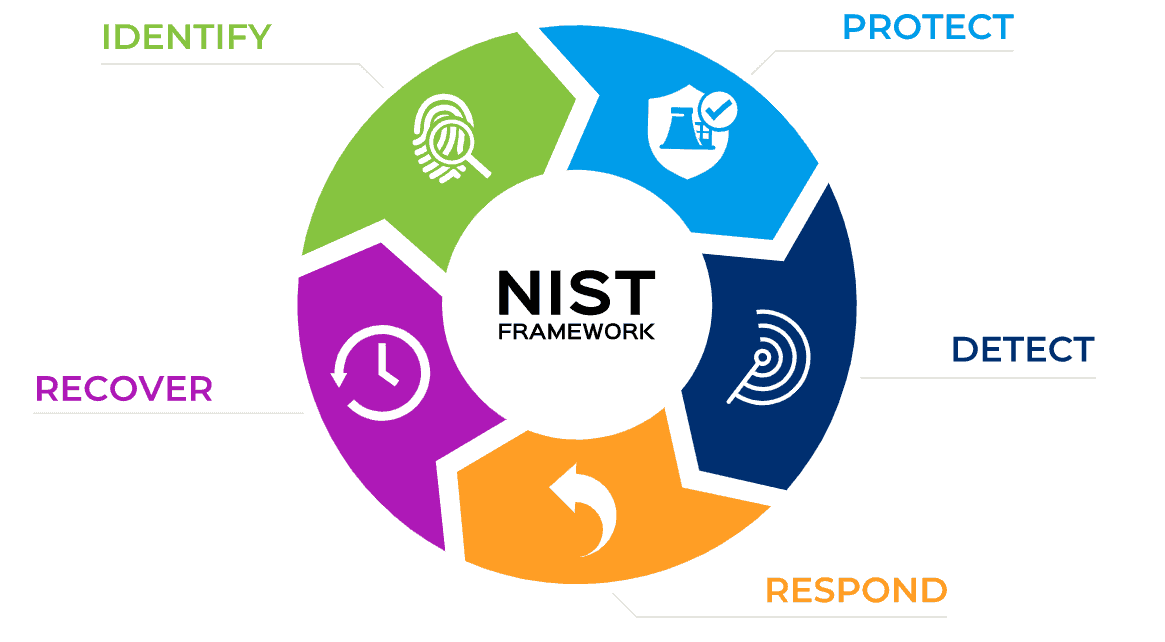
Backup and disaster recovery: Ensure data is replicated and recoverable.
For Kubernetes specifically:
- Use RBAC wisely.
- Enable admission controllers to enforce policies.
- Monitor with tools like Prometheus.
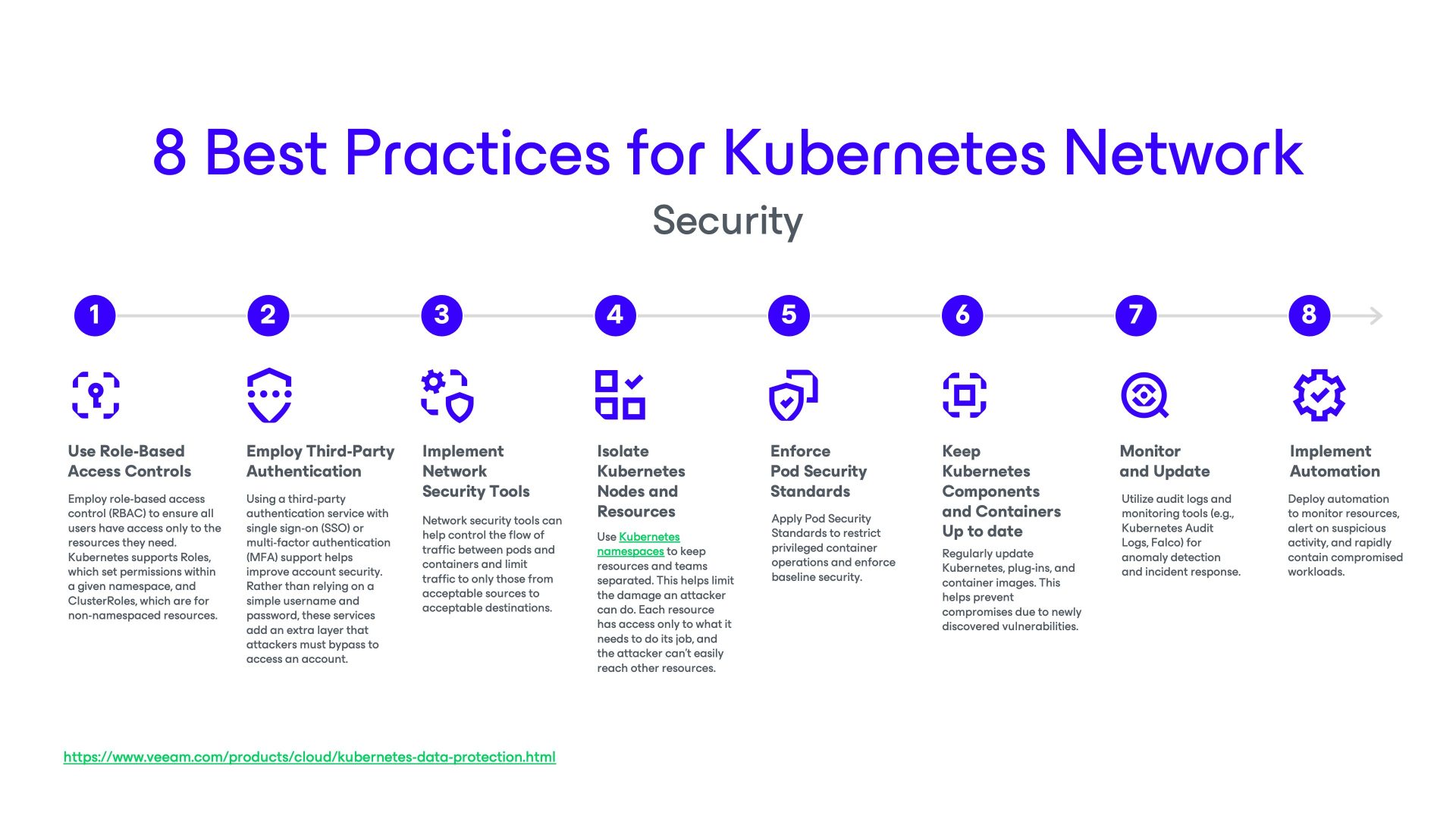
Image credit: www.veeam.com
In serverless, secure functions with least privilege IAM roles, monitor invocations.
Patch management: Keep everything updated automatically.
Incident response: Have plans ready, use automation for quick containment.
For more on Kubernetes security, see our in-depth guide Kubernetes security essentials.
External best practices from Palo Alto Networks: What is Cloud-Native Security?.
Popular Tools and Technologies
Many tools support cloud-native security architectures.
For scanning: Aqua Security, Sysdig for containers.
CNAPPs (Cloud-Native Application Protection Platforms) like Wiz or Prisma Cloud offer end-to-end protection.
Service meshes: Istio, Linkerd for traffic management and encryption.
Monitoring: ELK Stack (Elasticsearch, Logstash, Kibana) or Splunk.
Provider-native: AWS GuardDuty, Azure Defender, Google Security Command Center.
Open-source options: Falco for runtime security, OPA (Open Policy Agent) for policy enforcement.
Choose based on your stack—multi-tool approaches work best.
For biology-related cloud apps, tools like BioPython can integrate, but that’s niche. Check our post on cloud tools for developers.
Real-World Case Studies
Look at Netflix. They use cloud-native security architectures with Chaos Engineering to test resilience. Their microservices are isolated, with heavy monitoring.
Another: Capital One breach in 2019 highlighted IAM issues, leading to stronger controls.
A positive one: Shopify uses Kubernetes with strict RBAC and automated scans, preventing major incidents.
These show that investing in architectures pays off. For case studies, visit SentinelOne’s blog: Cloud Native Security.
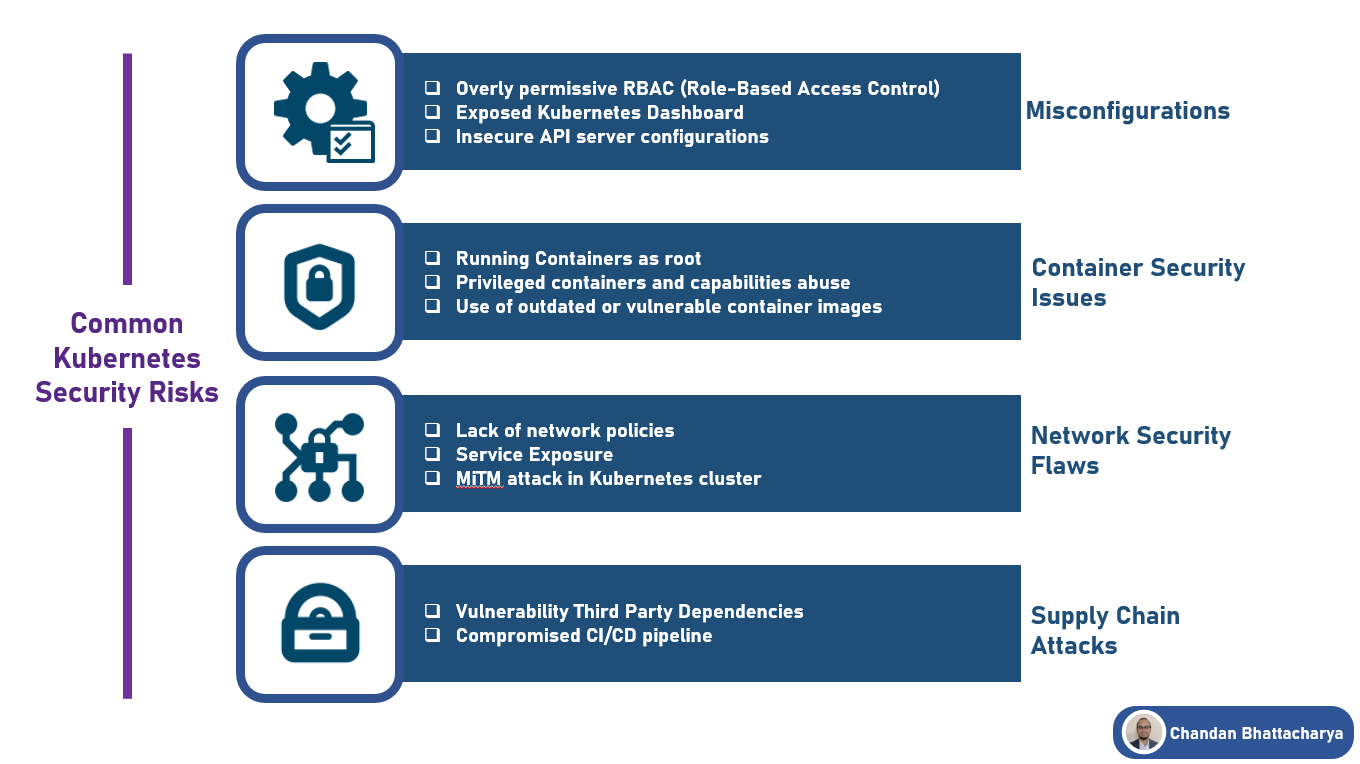
Image credit: medium.com
Emerging Trends in Cloud-Native Security
AI and machine learning are big. They detect threats faster by analyzing patterns.
Edge computing brings security closer to data sources.
Quantum threats loom, pushing for post-quantum encryption.
Sustainability: Secure architectures that optimize resources.
Supply chain security: Tools like SLSA (Supply-chain Levels for Software Artifacts) verify origins.
Stay updated via Cloud Security Alliance: CSA Blog.
Conclusion
Cloud-native security architectures are essential for safe cloud operations. By understanding components, following frameworks like the Four C’s, and using best practices, you can protect your apps effectively. Start small, assess your setup, and scale up.
For serverless specifics:
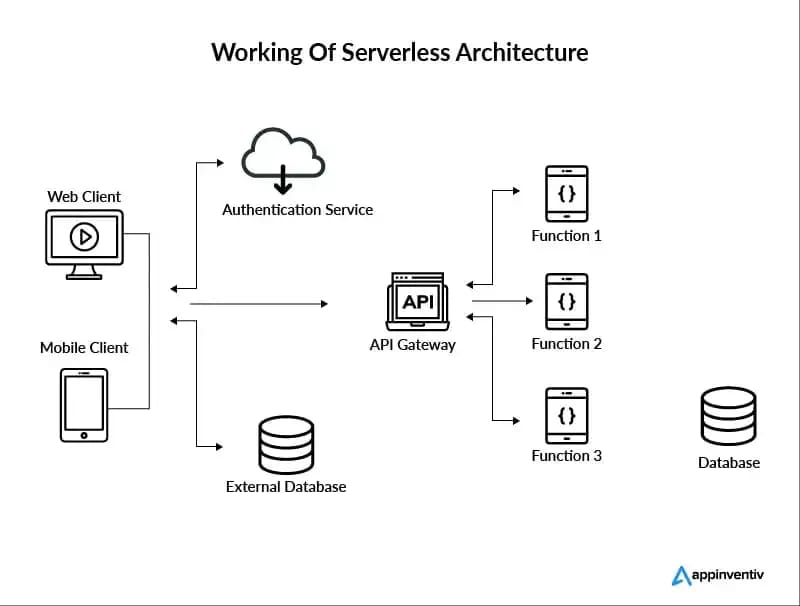
Image credit: www.altexsoft.com
Remember, security evolves—keep learning. Check our serverless guide for more.
If you’re implementing these, tools from Rackspace can help: Rackspace Cloud Native Security.
Share this content:






Post Comment