VPN vs ZTNA in 2026: Which One Should Your Business Use for Secure Remote Access?
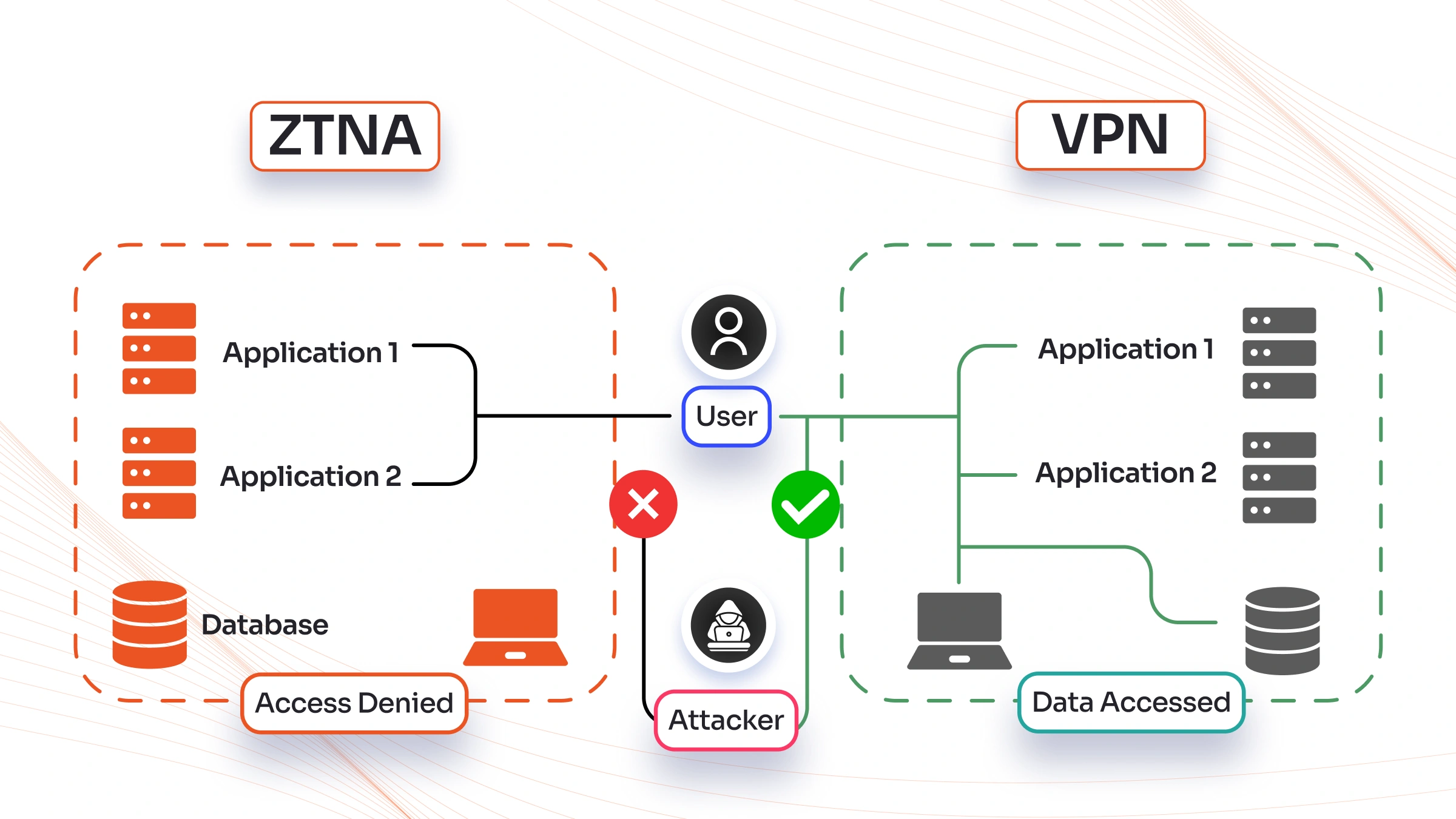
If you run a business in 2026, chances are your team works from different places — home offices, client sites, or even while traveling. Keeping everything secure without slowing people down is a real challenge. That’s why so many leaders are asking about VPN vs ZTNA right now.
Traditional VPNs have been around for years, but new threats and the way we work have changed everything. Zero Trust Network Access (ZTNA) is stepping up as a smarter, safer option for most companies. In this long guide, we’ll break down both technologies in simple words, compare them side by side, look at real costs and performance in 2026, and help you decide what fits your team best.
By the end, you’ll know exactly when to stick with a VPN, when to switch to ZTNA, or even use both for a while. Let’s get into it.

Image credit: Microsoft Learn – Secure remote and hybrid work with Zero Trust
What Exactly Is a VPN and How Does It Work in 2026?
A VPN, or Virtual Private Network, is like building a secret tunnel between your device and your company’s network. When you connect, all your internet traffic goes through this encrypted tunnel. It makes it look like you’re sitting right at the office, even if you’re in Jamshedpur working from a cafe.
Here’s the simple flow:
- You open the VPN app on your laptop or phone.
- You enter your username and password (maybe with extra steps like a code from your phone).
- The VPN software creates an encrypted connection to your company’s server.
- Once inside, you can access files, printers, internal apps — pretty much everything on the company network.
In 2026, most VPNs are still popular because they’re familiar and cheap to start with. Small businesses love them for letting remote staff grab shared drives. Big companies use site-to-site VPNs to connect branch offices safely.
But here’s the catch that many people miss: Once you’re connected through a VPN, the system usually trusts you with the whole network. It’s like giving someone the keys to the entire building after checking their ID at the front gate. If a hacker steals those keys (through phishing or a weak password), they can wander around freely — looking at HR files, customer data, or even critical servers.
Common types you’ll see today:
- Remote access VPN (for individual workers)
- Site-to-site VPN (for office-to-office links)
- SSL VPN (web-based, no full client needed sometimes)
- IPsec VPN (more technical, often for heavy-duty connections)
Many teams still rely on them because setup feels straightforward. You buy a license, install the client, and done. But as we’ll see later, that simplicity comes with hidden problems in today’s cloud-heavy world.

Image credit: ConceptDraw – VPN Network Diagram
Think about your own team. Do people complain about slow connections when using the VPN? Or do they forget to turn it on and accidentally use public Wi-Fi for sensitive work? These everyday frustrations point to why VPN vs ZTNA conversations are happening in boardrooms everywhere right now.
What Is ZTNA and Why Is Everyone Talking About It in 2026?
ZTNA stands for Zero Trust Network Access. The name sounds fancy, but the idea is simple and powerful: Never trust anyone or anything by default — always check, every single time.
Instead of giving broad network access like a VPN does, ZTNA works like a super-smart doorman for each individual app or resource. You only get the exact door you need, and the doorman keeps checking your ID, your badge, whether your phone has the latest security updates, and even if your location looks normal.
The core principles (straight from the Zero Trust model that experts recommend) are:
- Verify explicitly — check identity, device health, and context every time
- Use least privilege — give only the minimum access needed
- Assume breach — design everything as if attackers are already inside
How does it actually work day to day?
- A user wants to open the company CRM tool.
- The ZTNA system checks: Who are you? Is this your usual device? Is the device healthy (no malware)? Is the request coming from a risky location or at an odd hour?
- If everything looks good, it creates a temporary, encrypted connection straight to that one app — nothing else.
- The user never sees the full company network. Other apps stay hidden.
- The system keeps watching the whole time. If something looks off (like sudden unusual behavior), access can be cut instantly.
This is a game-changer in 2026 because most work happens in the cloud now — Google Workspace, Salesforce, Microsoft 365, custom apps on AWS or Azure. You don’t need to tunnel everything back to an old office server.
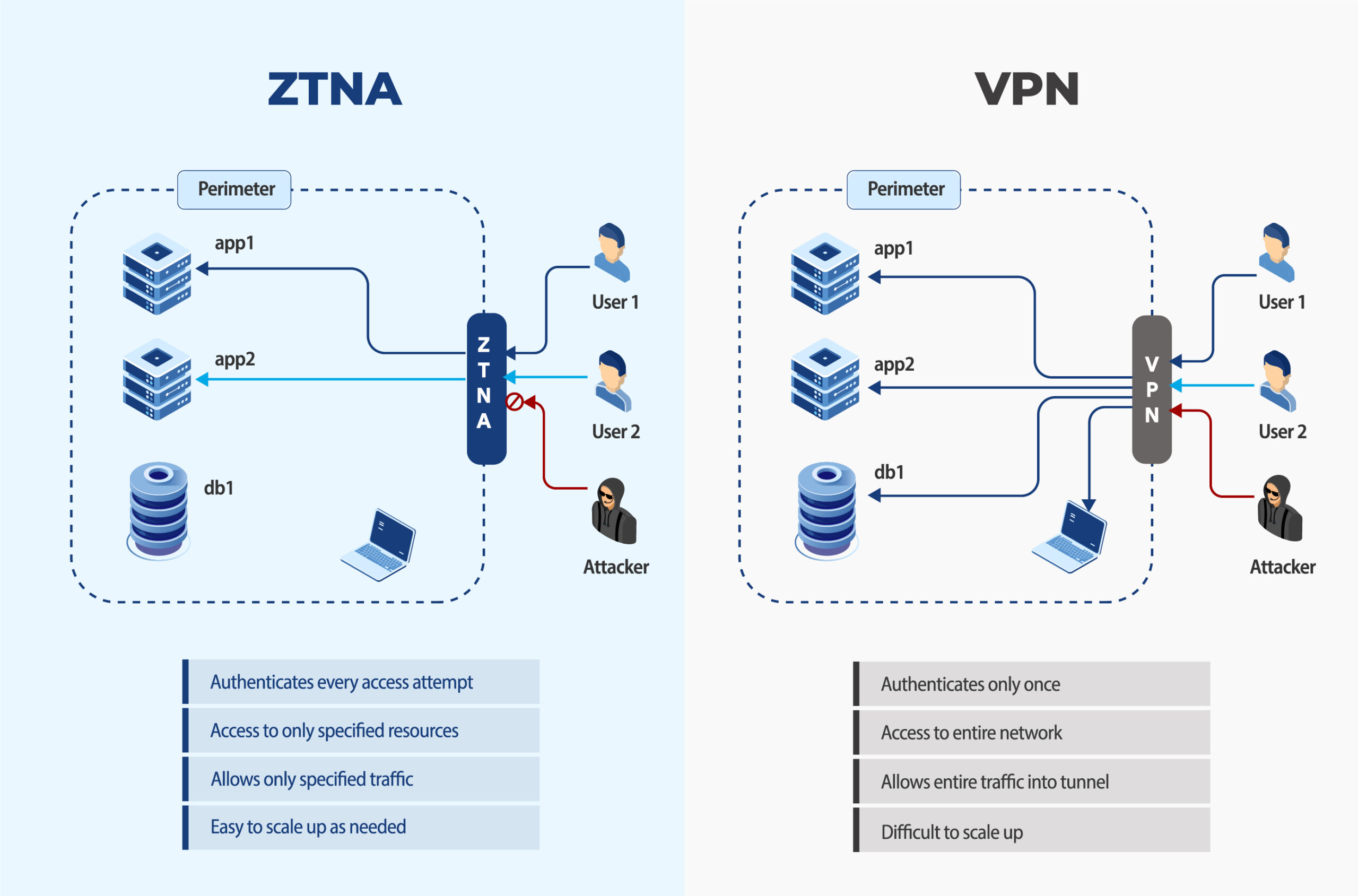
Image credit: 42Gears – ZTNA vs VPN side-by-side comparison diagram
ZTNA often comes as part of bigger platforms (sometimes called SASE — Secure Access Service Edge). These combine networking and security in the cloud, so performance stays fast no matter where your team is.
Many Indian companies, from startups in Bangalore to manufacturing firms in Jharkhand, are exploring ZTNA because remote and hybrid work became permanent after the pandemic years. Cyber insurance companies are even giving better rates to businesses that use Zero Trust approaches.
VPN vs ZTNA: The Detailed Side-by-Side Comparison
Let’s put them head to head so you can see the real differences clearly. This is based on how they perform right now in 2026 for typical businesses.
Access Model
- VPN: Gives network-level access. Once connected, you’re basically “inside” the whole private network.
- ZTNA: Gives application-level access only. You see and reach only what you’re allowed to, nothing more.
Trust Approach
- VPN: Trusts you after the first login (implicit trust). One successful connection = full access until you disconnect.
- ZTNA: Never trusts. Continuous verification every few minutes or for every new request (explicit trust).
Security Strength
- VPN: Good encryption, but big attack surface. If breached, attackers can move sideways easily.
- ZTNA: Much smaller attack surface. Apps stay invisible to outsiders. Even if one account is compromised, damage is limited.
Performance in 2026
- VPN: Traffic often gets “backhauled” through a central server. This adds delay, especially for cloud apps or video calls. Users in India accessing global SaaS tools notice lag.
- ZTNA: Direct connection to the app through nearby cloud points. Faster, smoother experience for modern tools.
Scalability
- VPN: Harder to grow. Need more servers, more maintenance, higher costs as team size increases.
- ZTNA: Cloud-native, scales automatically. Adding 100 new remote workers? No problem.
Management and Visibility
- VPN: Basic logs. Hard to see exactly who accessed what inside the network.
- ZTNA: Granular logs for every single access attempt. Perfect for audits and compliance (think GST, data protection rules in India).
User Experience
- VPN: Need to connect/disconnect manually sometimes. Can feel clunky on mobile.
- ZTNA: Often seamless or “always on” in the background. Users just open apps normally.
Here’s a quick summary table you can copy for your own notes:
| Feature | VPN | ZTNA |
|---|---|---|
| Trust Model | Implicit (trust once) | Zero Trust (verify always) |
| Access Scope | Full network | Specific apps only |
| Attack Surface | Large | Very small |
| Performance | Can add latency | Usually faster for cloud apps |
| Scalability | Limited by hardware | Excellent, cloud-based |
| Best For | Simple, small teams | Hybrid work, cloud-first companies |
| Cost Over Time | Lower upfront, higher long-term | Higher upfront, lower long-term |
This VPN vs ZTNA comparison shows why so many experts say ZTNA is winning for modern needs.
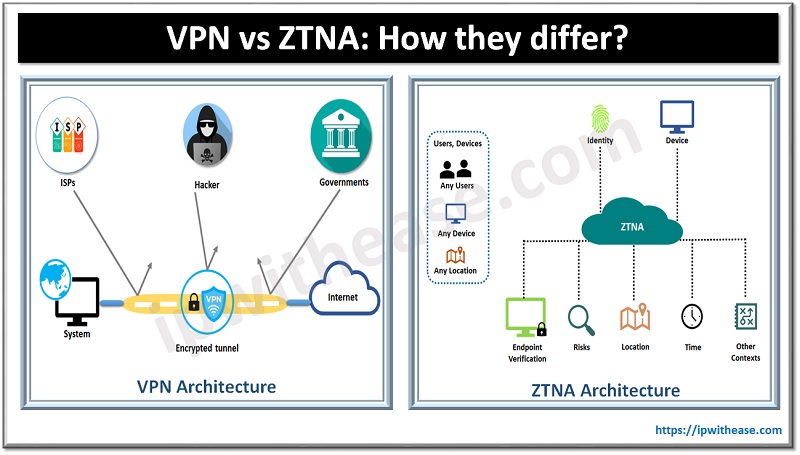
Image credit: IP With Ease – VPN vs ZTNA architecture comparison
Deep Dive on Security: Why ZTNA Wins Against 2026 Threats
Cyber attacks aren’t what they used to be. In 2026, most breaches start with stolen credentials or phishing. Ransomware groups target remote access points specifically.
With a traditional VPN, once an attacker is in, they can scan the entire network, find weak spots, and spread. We’ve seen real cases where one compromised VPN account led to millions in losses.
ZTNA stops this in multiple layers:
- Apps are hidden until verified.
- Every session is short-lived and checked continuously.
- Device posture matters — if your laptop is missing updates or has suspicious software, access gets blocked.
- Integration with identity tools (like Okta or Azure AD) adds adaptive controls.
For businesses handling customer data or operating in regulated sectors, this matters a lot. Cyber insurance providers in 2026 often require proof of Zero Trust controls for full coverage.
One practical example: A manufacturing company with factories in Jharkhand and sales teams across India switched to ZTNA. Before, their VPN let remote sales staff access everything, including production systems. After switching, sales people could only reach CRM and email — production systems stayed completely separate. When a phishing attempt hit one sales account last year, the damage was zero because nothing else was reachable.
Image credit: Aztech IT – Traditional perimeter vs Zero Trust security diagram
VPNs still have their place for very specific legacy systems that can’t be moved to the cloud. But for 90% of daily work in 2026, ZTNA provides stronger protection without the old risks.
Performance and Daily User Experience in Real Life
Nobody likes slow tools. In 2026, teams expect video calls to be crisp and file uploads to be instant.
VPN users often report:
- Higher latency when accessing SaaS tools
- Need to reconnect when switching networks
- Battery drain on mobiles
ZTNA users say:
- Apps open as fast as if they were in the office
- Works smoothly on any connection (hotel Wi-Fi, 5G, etc.)
- No extra steps most of the time
A global study of hybrid teams showed ZTNA reduced helpdesk tickets for remote access issues by over 60% compared to VPN setups. For growing Indian businesses expanding to multiple cities, this speed difference adds up to real productivity gains.
Cost Breakdown: VPN vs ZTNA in 2026
Many people think ZTNA is always more expensive. Let’s look at the full picture.
VPN Costs:
- Upfront: Server hardware or cloud VPN service ($500–$5000+ depending on size)
- Licenses per user
- IT time for maintenance, updates, troubleshooting
- Hidden costs: Downtime during peak hours, security incidents
ZTNA Costs:
- Usually subscription-based (per user per month)
- No big hardware needed
- Often bundled in SASE platforms
- Higher starting price but lower long-term because less maintenance and fewer incidents
For a 50-person company, a good cloud VPN might cost ₹8–15 lakh per year total. A solid ZTNA solution could start at ₹12–20 lakh but save money through reduced breaches, less IT staff time, and better cyber insurance rates.
Over 3–5 years, most businesses see ZTNA as cheaper when factoring in risk reduction.
How to Migrate from VPN to ZTNA Without Chaos
You don’t have to flip a switch overnight. Smart companies do it in phases:
- Assessment (2–4 weeks): Map all apps, users, and current VPN usage. Identify what can move first (SaaS tools are easiest).
- Pilot (1–2 months): Choose 1–2 departments. Set up ZTNA for key apps while keeping VPN for everything else.
- Expand gradually: Add more apps and users. Train everyone with short videos or sessions.
- Full cutover: Once confident, reduce VPN access for non-critical resources.
- Monitor and optimize: Use the detailed logs ZTNA provides to fine-tune policies.
Many vendors offer tools that work alongside existing VPNs during transition. This hybrid approach (yes, using both temporarily) is very common in 2026.
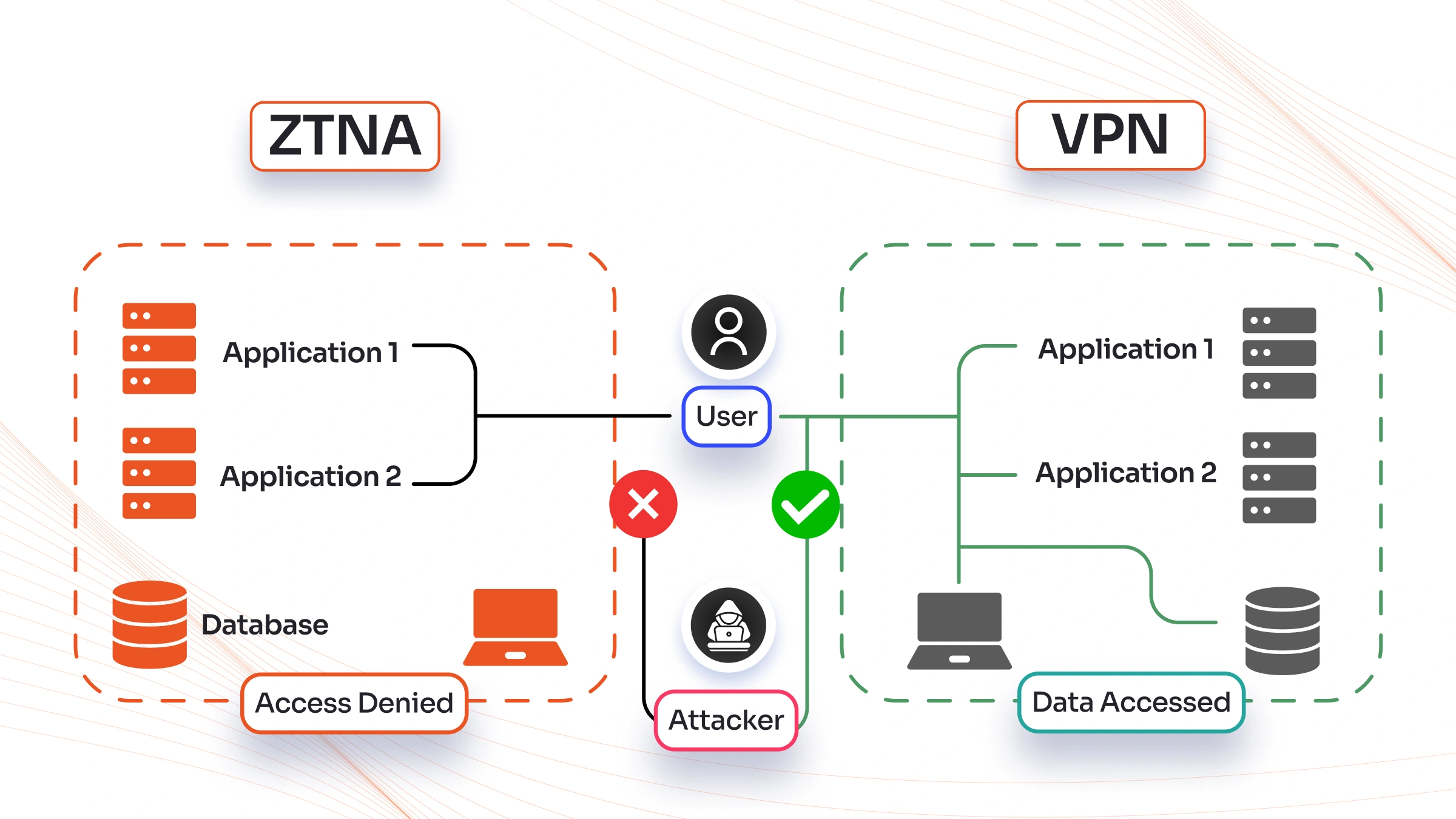
Image credit: miniOrange – ZTNA vs VPN access denied/allowed illustration
Real-World Use Cases That Show VPN vs ZTNA Differences
Small Business (10–50 people): A local accounting firm in Jamshedpur uses a simple VPN for file access. It works okay but they worry about client data if a laptop gets stolen. Switching to ZTNA would hide sensitive folders and add device checks — perfect for compliance.
Mid-Size Company (200+ people): A manufacturing exporter with remote sales and factory teams. VPN caused slow access to ERP system. ZTNA gave direct, fast access to only needed modules and cut security incidents.
Large Enterprise: Banks and healthcare providers already moved most remote access to ZTNA because regulations demand granular controls and full audit trails.
Even in education or government sectors in India, ZTNA helps protect student or citizen data better than old VPN setups.
Future Trends: What VPN vs ZTNA Looks Like Beyond 2026
By late 2026 and into 2027, expect:
- More AI-powered ZTNA that predicts risky behavior before it happens
- Tighter integration with SASE for full network + security in one cloud service
- Quantum-resistant encryption becoming standard (both technologies will adapt, but cloud-native ZTNA moves faster)
- Greater focus on “agentless” options so even contractors get secure access easily
VPNs won’t disappear completely — they’ll evolve into specialized tools for certain legacy or high-bandwidth needs. But for most remote and hybrid access, ZTNA (or full SASE) will be the default.
How to Decide: Questions to Ask Yourself Right Now
Ask these before choosing:
- How many remote/hybrid workers do we have?
- Do we use mostly cloud apps or on-premise servers?
- How important is compliance and audit reporting?
- What’s our budget for the next 3 years (including risk costs)?
- Can our IT team handle more advanced policies?
If your answers lean toward cloud, growth, and strong security — ZTNA is probably the winner. For very small teams with simple needs and tight budgets, a modern cloud VPN can still serve well.
Frequently Asked Questions About VPN vs ZTNA
Is ZTNA completely replacing VPN in 2026? Not yet for everyone, but yes for most new setups and migrations. Many keep a small VPN for specific legacy systems.
Does ZTNA require installing software on every device? Some solutions do (light agent), others are agentless or browser-based. It depends on the vendor.
Can small businesses afford ZTNA? Yes — many affordable options exist now, with pricing starting lower than enterprise solutions. Check for India-specific partners.
Will switching improve internet speed? Usually yes, because traffic doesn’t detour through a central server.
What about mobile workers on 4G/5G? ZTNA generally performs better on variable connections.
Do I need to be a security expert to set up ZTNA? Good vendors provide guided setup and managed services. Start with a proof-of-concept.
Is data safer with ZTNA even if an employee clicks a phishing link? Much safer — because access is limited and monitored continuously.
Can VPN and ZTNA work together? Absolutely. Many companies run both during transition or for different use cases.
How long does migration usually take? For small teams: 1–3 months. Larger organizations: 6–12 months phased.
What should I look for in a ZTNA provider? Strong identity integration, good local support in India, transparent pricing, and proven uptime.
Final Thoughts on VPN vs ZTNA for Your 2026 Strategy
The VPN vs ZTNA debate isn’t about one being universally bad and the other perfect. It’s about matching the right tool to how your business actually works today.
Traditional VPNs served us well for decades, but the world has moved on. Cloud apps, permanent hybrid teams, smarter attackers, and stricter rules mean we need something better.
For most organizations in 2026 — especially growing ones in India and globally — ZTNA delivers stronger security, better speed, easier management, and future-proofing without the old headaches.
Start small. Test ZTNA for your most important cloud tools. Talk to your IT team or a trusted partner. The shift doesn’t have to be scary, and the benefits show up quickly in fewer worries and happier users.
Your data, your team, and your peace of mind are worth it.
If you’re ready to explore options or need help comparing specific solutions for your setup, drop a comment below or reach out. We’ve helped many businesses make this exact VPN vs ZTNA decision successfully.
Stay safe out there — and here’s to secure, seamless work in 2026 and beyond!
Share this content:









Post Comment