Fighting AI-Generated Phishing: Advanced Detection Methods
Fighting AI-Generated Phishing has become one of the biggest challenges for individuals and businesses in 2026. Those slick emails that look exactly like they came from your boss or your bank? Many of them are now written by artificial intelligence in minutes, not hours. They have perfect grammar, personal details pulled from your LinkedIn profile, and no spelling mistakes to give them away.
The numbers are eye-opening. Reports show an 1,265% surge in phishing attacks linked to generative AI. Over 82.6% of phishing emails today use some form of AI to craft the message. Click rates on these AI-crafted scams hit 54% in tests, compared to just 12% for traditional ones. That means people are four times more likely to fall for them.
This post walks you through everything you need to know about Fighting AI-Generated Phishing with advanced detection methods that actually work. You will learn what makes these attacks so dangerous, why your old email filters miss them, and the smart techniques security teams use right now to stop them before they reach your inbox.
Whether you run a small business, work in IT, or just want to protect your own accounts, these practical strategies will help you stay safe. Let’s get into it.
AI-Generated Phishing and Why It Is So Dangerous
AI-generated phishing takes the old scam and supercharges it with technology. Attackers feed public information about you or your company into tools like large language models. The AI then writes an email that sounds exactly like a real person you know. It can copy writing style, mention recent projects, or reference a meeting that actually happened last week.
Think about a typical business email compromise attack. In the past, crooks might send a clumsy message asking for a wire transfer. Today, the AI version references the exact invoice number from last month, uses the same casual tone your CFO normally uses, and even times the message for when your boss is usually in a hurry.
The threat goes beyond email. Voice cloning creates phone calls that sound identical to your colleague. Deepfake videos show someone who looks and talks just like the company CEO asking for urgent help. Fake websites built in seconds copy every pixel of your bank’s login page.
What makes Fighting AI-Generated Phishing so tough is the speed and scale. One report found AI can create a convincing phishing email in five minutes. A skilled human needed sixteen hours for the same quality. That 192 times faster pace means attackers test hundreds of versions, tweak what gets blocked, and flood inboxes with fresh campaigns every hour.
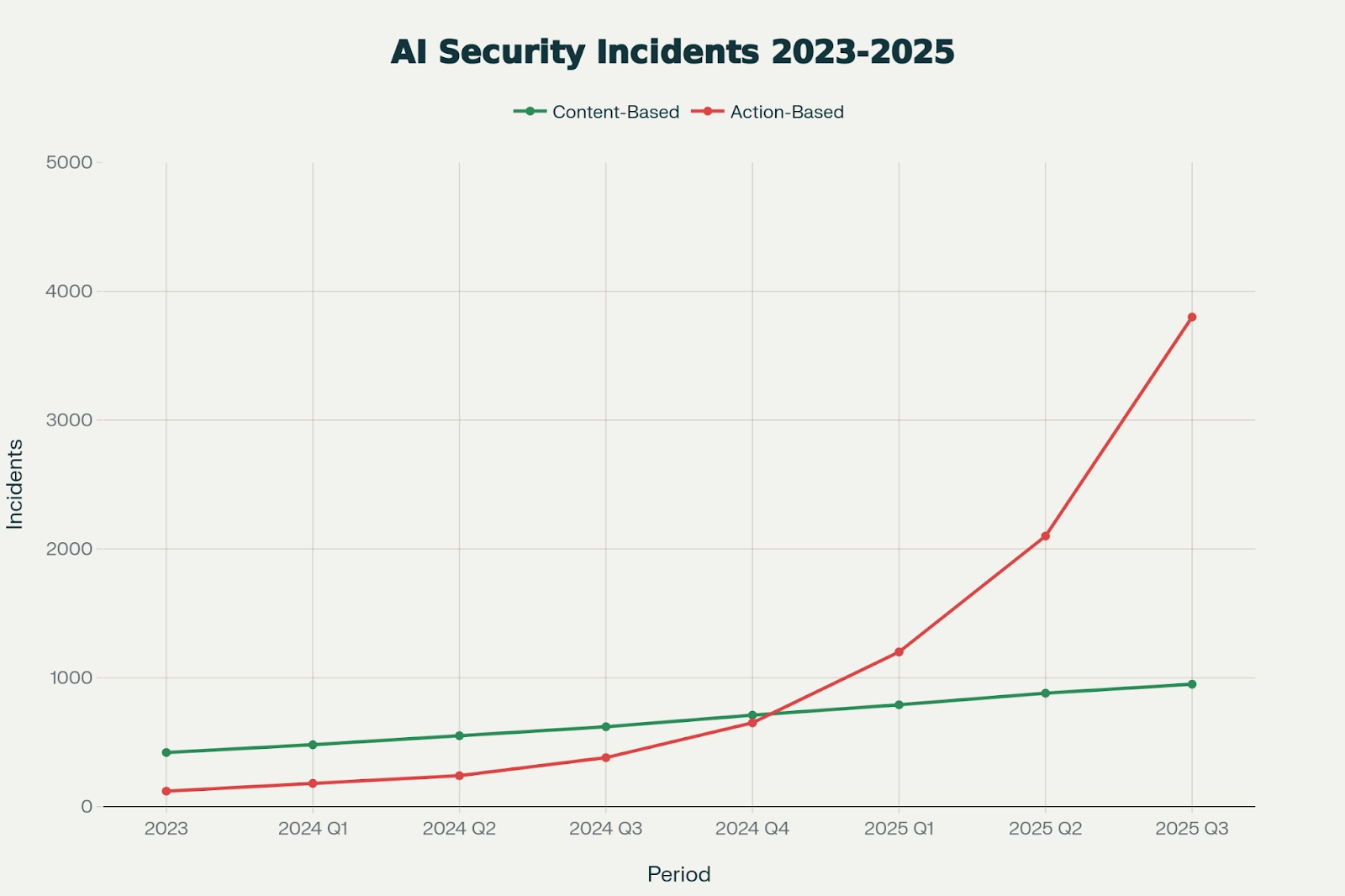
Look at the chart above showing the sharp rise in AI-related security incidents. The red line for action-based attacks climbs steeply into 2025. This matches what security teams see every day – more sophisticated attacks hitting harder and faster.
These attacks succeed because they remove the classic red flags. No more broken English. No generic greetings like “Dear Customer.” Instead, the message feels warm, urgent in a believable way, and perfectly tailored. Your brain thinks “this must be real” before you even finish reading.
Why Traditional Detection Methods No Longer Cut It
For years, email security relied on simple rules. Block anything with certain keywords. Check sender reputation against blacklists. Scan for known malware signatures. These worked when phishing was sloppy and repetitive.
AI changes the game completely. Every email is unique. The AI rewrites it slightly for each recipient so no two look the same. Signature-based systems see nothing they recognize. Blacklists can’t keep up when new domains pop up every few minutes.
Even basic machine learning from a few years ago struggles. It was trained on old patterns – misspelled words, odd links, generic urgency. Modern AI phishing avoids all that. It uses real company logos, correct formatting, and language that matches how people actually write.
One big problem is polymorphic attacks. The AI changes tiny details constantly – different wording, new link shorteners, fresh attachment names. Traditional filters look for exact matches or close patterns. They miss the new variations every time.
Another issue is the zero-hour problem. Attackers launch campaigns and pull them down before security researchers can study them. By the time a signature gets added, the damage is already done for many victims.
This is exactly why Fighting AI-Generated Phishing requires moving beyond reactive, rule-based defenses to proactive, intelligent systems that understand context and behavior.
Machine Learning and Anomaly Detection: The New Front Line in Fighting AI-Generated Phishing
Machine learning sits at the heart of modern defenses against AI phishing. These systems don’t just look for bad keywords. They learn what normal communication looks like inside your organization and flag anything unusual.
Here’s how it works in simple terms. The ML model studies thousands of legitimate emails between team members. It learns typical send times, common topics, who talks to whom, and even writing habits. When a new email arrives that breaks those patterns – say, the accounting manager suddenly emailing the CEO about an urgent payment at midnight – it raises a red flag.
Advanced systems use unsupervised learning to spot anomalies without being told exactly what to look for. They build behavioral baselines for every user and every department. A sudden request for sensitive files from someone who never asked before gets extra scrutiny.
Microsoft Defender for Office 365 shows this in action. Their AI looks at infrastructure signals like suspicious domains, behavioral clues like self-addressed emails with hidden recipients, and message context like unusual file types. In one real case from August 2025, they caught an AI-obfuscated campaign using a fancy SVG file disguised as a PDF. The AI-generated code inside was verbose and over-engineered – exactly the kind of artifact machine learning now spots easily.
The beauty of these systems is they get smarter over time. Every blocked attack teaches the model. False positives drop as it understands your specific environment better. Many companies report catching 95% or more of sophisticated phishing with these tools.
For Fighting AI-Generated Phishing at scale, combine ML with threat intelligence feeds that update in real time. When a new AI phishing kit appears on underground forums, the system knows within minutes.
Natural Language Processing: Understanding the Intent Behind the Words
Natural Language Processing (NLP) takes email analysis to the next level. While older filters checked for words like “urgent” or “password,” NLP understands meaning, tone, and emotional manipulation.
Modern NLP models trained on millions of real emails can detect subtle things. Does this message create artificial urgency that doesn’t match normal business practice? Is the tone slightly off from how this person usually writes? Does it ask for actions that don’t fit the relationship between sender and recipient?
In practice, NLP breaks the email into context. It looks at the entire conversation history. If the “CEO” suddenly asks for gift cards with no previous discussion, that’s a huge warning sign. The system also analyzes sentence structure and vocabulary patterns that AI tools tend to produce – sometimes too perfect or repetitive in ways humans aren’t.
Psychological cues still slip through even the best AI writing. Attackers love fear, greed, or secrecy. NLP flags messages that push these buttons too hard. “Do this now or the deal falls through” combined with a request for login details raises immediate alerts.
Tools using advanced NLP can even compare the email against known legitimate templates from the same sender. Small inconsistencies in phrasing get highlighted for review.
When you combine NLP with machine learning, you get a powerful one-two punch for Fighting AI-Generated Phishing. The system doesn’t just see the words – it understands the story the email is trying to tell and whether that story makes sense.
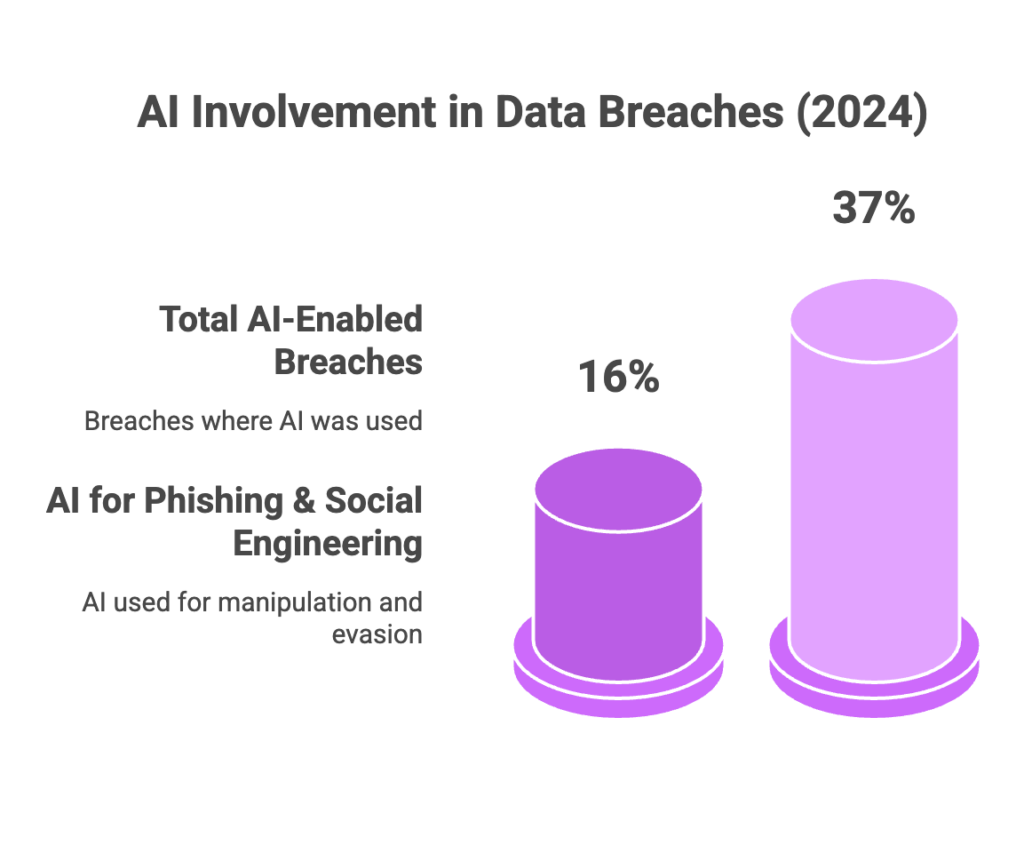
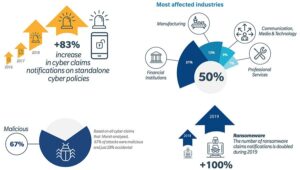
The chart above drives home why this matters. AI involvement in data breaches reached 37% in recent data, with a big chunk tied to phishing and social engineering. NLP helps cut through the noise.
Behavioral and Contextual Analysis: Looking at the Bigger Picture
Advanced detection doesn’t stop at the single email. It looks at the full context around it.
Behavioral analysis builds a profile of normal activity. Who does the finance director normally email? What time of day? What kinds of attachments? When something falls outside those norms, the system pauses delivery or adds extra checks.
Contextual signals include:
- Is this the first time this sender has contacted this recipient?
- Does the request match recent company events or projects?
- Are there sudden changes in communication volume from this account?
- Does the timing align with known business cycles?
Many platforms now create relationship graphs inside the organization. They map who talks to whom regularly. A message from the “IT helpdesk” to the CFO asking for remote access when they have never interacted before triggers deep investigation.
Real-time sandboxing adds another layer. Suspicious links or attachments get opened in a safe virtual environment before reaching the user. The system watches what the link actually does – does it try to steal credentials or install malware?
For Fighting AI-Generated Phishing, this multi-layered approach is crucial because attackers can make the message look perfect, but they can’t perfectly mimic the entire history and relationships inside your company.
Multi-Modal Detection: Checking Text, Images, Links, and More
Today’s best defenses examine every part of the message together.
Text gets the NLP treatment. Links go through real-time reputation checks plus predictive analysis – even brand new domains get scored based on registration patterns and hosting behavior. Attachments run through sandbox execution to see actual behavior.
Images and attachments get special scrutiny. AI can generate fake invoices or documents that look identical to real ones. Advanced systems use computer vision to spot tiny inconsistencies or known AI generation artifacts in images.
URL analysis has become incredibly sophisticated. Tools monitor Certificate Transparency logs to catch newly registered suspicious domains instantly. They also check for homoglyph attacks where characters look similar but are different (like using a Cyrillic “а” instead of Latin “a”).
All these signals feed into a single scoring engine. Even if each piece looks okay on its own, the combination might reveal the scam.
Top Tools and Platforms for Fighting AI-Generated Phishing Effectively
Several enterprise-grade solutions lead the way in 2026. Here are some of the strongest options based on current performance:
Check Point stands out with excellent real-time protection and constantly updated threat intelligence. Their AI analyzes patterns across text, behavior, and infrastructure. They also offer role-based phishing simulations to train your team.
Proofpoint provides strong coverage for BEC attacks, malicious URLs, and attachments. The platform adapts quickly and includes excellent training materials.
Microsoft Defender for Office 365 integrates seamlessly if you already use Microsoft 365. It caught the AI-obfuscated SVG campaign mentioned earlier through combined infrastructure and behavioral signals. Features like Safe Links and Zero-hour Auto Purge work really well.
Cofense focuses on fast remediation – quarantining threats in minutes. Their machine learning improves daily with real threat data.
Barracuda learns your organization’s specific email patterns and gets more accurate over time. It often stops attacks before they hit the inbox.
When choosing a tool, look for strong behavioral analysis, advanced NLP, low false positives, and good integration with your existing email system. Many offer free trials – test them with your own traffic.
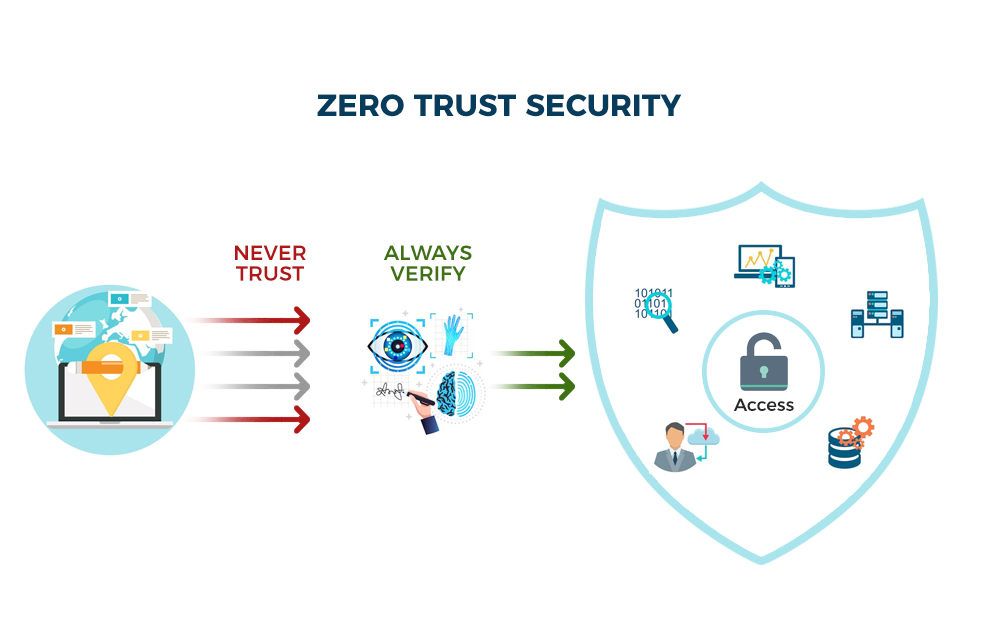
The zero trust diagram above shows the “never trust, always verify” mindset that pairs perfectly with these tools.
Real-World Success Stories in Fighting AI-Generated Phishing
Microsoft’s detection of the August 2025 campaign offers a perfect example. Attackers used AI to obfuscate malicious SVG code with business terms and complex structure. Traditional tools might have missed it, but Defender spotted the unusual file type, suspicious domain, self-addressed email trick, and behavioral red flags. The campaign was blocked before most targets even saw the messages.
Organizations using behavioral baselines report catching hyper-personalized BEC attempts that referenced internal projects correctly. One manufacturing company stopped a $2.4 million attempted wire transfer because the system noticed the “vendor” email didn’t match normal communication patterns with that supplier.
Small businesses using affordable AI email gateways have seen 90%+ reduction in successful phishing after implementation. The key is combining technology with simple processes – like requiring phone verification for any financial request.
Step-by-Step Guide to Implementing Advanced Detection
Start with assessment. Review your current email security and identify gaps against AI threats.
Next, choose and deploy the right platform. Most integrate with Microsoft 365 or Google Workspace in hours.
Set up behavioral baselines. Let the system learn normal patterns for two to four weeks.
Enable multi-factor authentication everywhere, especially for email and financial systems. Add conditional access rules that require extra verification for unusual logins.
Train your team with realistic simulations that include AI-generated examples. Focus on verification habits rather than just spotting bad grammar.
Create clear reporting processes. Make it easy for employees to forward suspicious emails with one click.
Monitor and tune. Review weekly reports and adjust sensitivity as needed.
For individuals, the process is simpler but just as important. Always verify unexpected requests through a separate channel – call the person or use a known good number. Hover over every link before clicking. Use password managers and unique passwords. Enable dark web monitoring for your email addresses.
Practical Tips You Can Use Today for Fighting AI-Generated Phishing
- Pause before acting. AI creates urgency on purpose. Take a breath and verify.
- Check the full email address, not just the display name.
- Use browser extensions that check links in real time.
- Keep software updated – patches close many exploitation paths.
- Limit personal information you share publicly.
- Set up email rules that flag external emails with internal-looking subjects.
- For businesses, implement payment verification procedures that require multiple approvals.
These habits, combined with advanced tools, make a massive difference.
What the Future Holds for Fighting AI-Generated Phishing
The arms race continues. Attackers are moving toward agentic AI systems that can handle entire multi-step campaigns autonomously. Detection will need to evolve with even more sophisticated behavioral modeling and cross-platform analysis.
We will see more AI-versus-AI battles where defensive models specifically trained to spot generative artifacts become standard. Quantum-resistant encryption and better identity verification like passkeys will help reduce the impact when breaches do occur.
The winners will be organizations that treat security as a continuous process rather than a one-time setup.
Common Mistakes That Still Get People Hooked
Relying only on gut feeling. Even experts get fooled by perfect AI writing.
Clicking “just to check.” Never open suspicious attachments or links.
Ignoring verification policies because “it looked real.”
Not reporting suspicious emails. Every report helps improve the whole system’s learning.
Treating security tools as set-it-and-forget-it. They need regular review.
Avoid these traps and you stay ahead.
Conclusion: Taking Control in the Fight Against AI-Generated Phishing
Fighting AI-Generated Phishing is absolutely possible with the right combination of advanced technology, smart processes, and human vigilance. The tools exist today. The knowledge is here. What matters is putting them into practice consistently.
Start small if needed. Pick one advanced detection layer, train your team on verification habits, and build from there. Every step reduces risk dramatically.
The attackers have AI on their side, but so do we. By staying informed and using modern defenses, you can keep your data, money, and peace of mind safe.
Stay safe out there. The next suspicious email you spot and report might save your organization from a major breach.
Frequently Asked Questions About Fighting AI-Generated Phishing
What makes AI-generated phishing different from regular phishing? AI versions have perfect language, hyper-personalization, and get created at massive scale with almost no errors. Traditional ones often had obvious mistakes.
Can regular antivirus stop AI phishing? Basic antivirus helps with malware but struggles with the social engineering part. You need specialized email security with AI and behavioral analysis.
How do I check if an email is AI-generated? Look for subtle tone issues, verify through another channel, and use tools that analyze intent. No single test is 100% but combining signals works well.
Are free tools enough for Fighting AI-Generated Phishing? For personal use, good free or built-in options like Gmail’s filters plus manual verification help a lot. Businesses need enterprise solutions for full protection.
What is the best way to train employees? Use realistic AI-powered simulations regularly. Focus on verification habits rather than just spotting fakes. Make it ongoing, not once a year.
Does zero trust help against phishing? Absolutely. By never assuming trust and always verifying, zero trust limits damage even if someone clicks a bad link.
How quickly do new AI phishing techniques appear? New variations can show up daily. This is why real-time, adaptive detection systems are essential.
Can AI detect other AI perfectly? Current systems catch the vast majority by looking at context and behavior that AI can’t fake consistently. The technology improves monthly.
What should I do if I think I clicked a phishing link? Change passwords immediately from a clean device. Enable 2FA everywhere. Scan your computer and report to IT or your security team right away.
Is Fighting AI-Generated Phishing only for big companies? No. Small businesses and individuals face the same threats. Affordable tools and good habits protect everyone effectively.
Share this content:





Post Comment